

|
Testimonial
Amazing...simply amazing. I recently purchase the Mixing Suite from Cakewalk and Elephant from here. Both purchases were made two days ago. So far I've only used GlissEQ and Elephant, and I am amazed. The things I thought I had to live with were made right by GlissEQ. Elephant is superb. It can be adjusted to 1/10th of a decible with ease. The controls on Elephant are designed so as I adjust the knobs with the mouse the knobs move slowly on the screen. So if I want 2.3db out I don't have to settle for 2.5 because Elephant glides smoothly to where I want it. Aleksey Vaneev you've changed the world and don't even know it.
Jason Washington
|
Voxengo GlissEQ
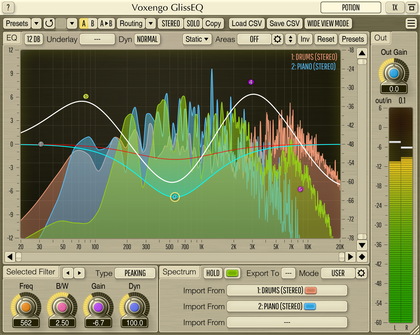
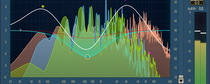
GlissEQ is an analog-style equalizer in plug-in form. The most interesting thing GlissEQ offers is its dynamic equalization performance. Using almost any existing equalizer, you always get what you have set: e.g., if you specify a +6 dB boost at 100 Hz you get exactly a +6 dB boost at 100 Hz, also visible on the spectrum analyser. GlissEQ offers a slightly different approach. When you specify +6 dB at 100 Hz, you don't necessarily get +6 dB of gain. Actual filter gain is adjusted dynamically according to the program material you are filtering.
This `dynamic nature' of GlissEQ gives you a much more friendly, assisting filtering experience. Boosting up the highs will not necessarily create the fatiguing effect of overload. Instead, you will get a pleasant transient-emphasizing effect bringing life and dimension to your track: thus, GlissEQ sounds simply musical.
This transient emphasis works for every frequency you tune the filter to: e.g., it can be useful at the lower and the mid frequencies to give more punch to the track. Moreover, the strength of transient emphasis and the overall filter gain adjustment can be controlled with a special 'Dyn' control. In reality, this 'Dyn' control adds a whole new dimension to the equalizer as you know it!
Beside this wonderful `dynamic nature' GlissEQ offers a built-in FFT spectrum analyzer. Moreover, the spectrum of the track can be exported to any other instance of GlissEQ thus making interchannel spectrum overlays possible. This can help you to free frequency ranges in one track to allow the instrument in another track occupying these frequencies breathe.
Features
- Convenient user interface
- Five filter bands
- Eight filter types
- Real-time spectrum analyzer
- Interchannel spectrum overlays
- High quality mode
- Three dynamic modes
- "A-to-B" comparisons
- Factory presets
- Mono-to-Stereo, Stereo-to-Stereo processing
- Any sample rate is supported
- Internal 64-bit processing
- Native assembler DSP code
Requirements
- Windows 98 or any later Windows OS
- About 1 MB of harddisk space
- 1+ GHz processor
- Audio application supporting VST plug-ins
Demo Limitations
Processing is interruped with a short beep every 45 seconds.
Question
Why GlissEQ is so unique?
With GlissEQ you can emphasize the transients in a very natural and musical way. E.g., say you have a poorly defined bass. In this case, you simply need to tune a moderately wide Peaking filter around 80-100 Hz with Dyn around 7. Then simply add a gain. And so, even if your bass had almost no outstanding transients, it will have now.
The same applies to the higher frequencies.
In the end, it makes everything much more pronounced.
Please note the following: most of the time during equalizing you won't always need the given filter gain, because parts of the program material can already be crowded with some frequencies. The standard filter will increase these already-loud frequencies, too, which would not sound musical. Dynamic EQ in such situation will decrease the filter's gain, thus making the equalization sound better and somehow more natural/musical.
What's New
Version 2.9.1, 24-apr-2008
Minor fixes.
Version 2.9, 08-aug-2007
- Spectrum analyzer now shows input signal analysis when in Bypass mode.
- Access violation error on systems with >2GB memory solved.
Version 2.8, 13-sep-2006
Number of overlay channels increased to 48.
Version 2.7, 12-nov-2005
- Fixed incorrectly displayed In/Out RMS level difference in Alt and High quality modes.
- Fixed keyboard 'stealing' when plug-in is used in Cubase SX 3.1.
- Spectrum display precision increased - especially when displaying single frequency peaks at the Full resolution.
Version 2.6, 23-may-2005
- Import and EQ Mode buttons rearranged.
- In/out RMS level difference counter added.
- Frequency response display now reflects Mute and Solo switches of the bands.
Version 2.5, 24-mar-2005
- Cursor point readout implemented. This readout is shown in the bottom left corner of the control surface.
- Import function implemented. You may use this function to load EQ band definition file generated by Elevayta SpaceBoy plug-in.
Version 2.4, 24-jan-2005
- A new and a very different quality mode implemented 'Alt Quality'. This mode brings a whole new quality dimension to GlissEQ.
- Narrow band sweeping function implemented (hold the CTRL key and press the left mouse button on GlissEQ's control surface). This function allows you to listen in a sweepable manner to a selectable narrow band in order to detect various sonic artifacts.
- GlissEQ now preserves state of the solo and mute switches between sessions. Also note that a pressed mute switch will be unpressed whenever you start dragging according filter's point on the control surface.
Version 2.3, 09-dec-2004
- Minor issues fixed.
- Output clipping indicator added. It will turn red if three sequential clip incidents were detected on any of the output channels.
- "Auto quality" mode added. The Auto mode selects the Normal mode during real-time processing; during offline/bounce processing the High quality mode is used. Please note that your previously created presets may require readjusting of this parameter (if you previously used 'High' it will turn into 'Auto').
Version 2.2, 20-sep-2004
- Filter processing efficiency in Dyn mode 0 improved.
- Bar graph spectrum display modes implemented.
- Additional spectrum update speed options added.
Version 2.1, 10-may-2004
- A denormal bug which happened when the high-shelf filter was used fixed.
- Now bandwidth of both the low-pass and high-pass filters can be adjusted. Please note that presets created with the previous version of GlissEQ will be automatically adjusted so that they have the bandwidth setting compatible with the previous version.
- "Mute" switches added for each filter.
- Now you can hold the Shift key to enable a four times more precise movement of the control points.
- Dyn mode 0 implemented. In this mode the dynamic behavior of the filter is completely disabled.
- Filter type switching with the right mouse button now allows selection of the low-pass and high-pass filters.
- Now mouse wheel can be used to control knobs and to adjust the bandwidth of the filters on the control surface. Before the mouse wheel starts to work you should click the user interface window anywhere (so that GlissEQ window gains focus).
Version 2.0, 23-mar-2004
- A major update of the user interface. This newer version does not support previous version's presets and so its DLL is named VoxengoGlissEQ2.DLL allowing you to use previous version DLL, too, thus simplifying migration.
- Output FFT spectrum analyzer with variable block sizes and update speeds implemented.
- It is now possible to overlay spectrums obtained from one to four other instances of GlissEQ running in parallel in the same project (probably on other tracks).
- Now automation should work smoother: low-pass and high-pass filters can be automated without unmusical clicking happening.
- EQ mode 3 implemented. It may give a `bigger' sound than the other modes.
Version 1.1, 04-jan-2004
- Solo buttons added. Now it is possible to solo any band you are tuning.
- Mono signal processing implemented.
- New filters implemented.
- EQ modes implemented. For example, mode 2 gives a slightly smoother sound than the default mode 1.
- Now, CTRL key can be used to adjust filter point's gain, alone. ALT key can be used to adjust filter point's frequency, alone.
- Bypass switch button added.
Version 1.0, 21-nov-2003
Initial release.