|
Date: Jan 7, 2007, 4:53am
Hi Alexkey,
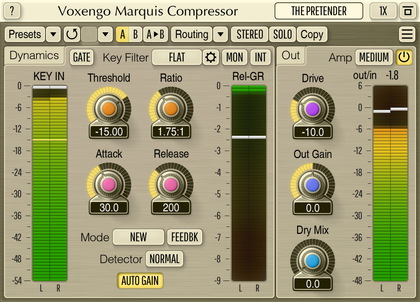
I love using your Marquis Comp but I have one problem with it; I cannot switch between Phasy and Linear when using it in my host, Tracktion 2. When I click on the button I see the option to select Phasy or Linear but when I try to change it the button just displays the previously selected setting. The only way I have found to change the setting is to load a preset with either Phasy or Linear, depending on which setting I want, already selected. Can you confirm this issue? Is there another workaround? I'm thinking it might have something to do with latency compensation as Linear mode has an increased latency.
Thanks,
Doug
Date: Jan 7, 2007, 12:50pm
The only workaround is to press stop/start on the transport, or press master enable/disable for the effect. The fact you can't switch between Phasy and Linear is due to limitation of VST implementation in Tracktion. Plug-ins can't control sequencer and the way it reacts on plug-in's requests (and Marquis does send a request to change settings to the sequencer).
Date: Jan 7, 2007, 5:00pm
Thanks Aleksey!
I'll give your suggestions a try tomorrow. Thanks!
-Doug
Date: Jan 7, 2007, 10:33pm
You are welcome!
Date: Jun 8, 2007, 2:12am, edited 1 time(s), last modified on Jun 8, 2007, 2:13am
Hey Aleksey,
Could you go into more detail about what would need to be done in tracktion for this to work correct? There are quite a few tracktion users using Marquis who are also running into this problem. I have also found myself in a unique position of having a direct line of communication with the developers of Tracktion. I would like to pass on your reply directly to them so that this issue can be addressed. Please feel free to be specific and technical in your reply. This will help get tracktion working as best as possible with Marquis and any other plugin that changes latency on the fly. It will also benefit you as there are quite a few tracktion users holding off on Marquis.
Thanks for your help,
Doug
Date: Jun 8, 2007, 10:07am
For this switch to happen automatically in Tracktion, tracktion should react to "ioChanged()" calls that are called from the plug-in side. In the case of such case Tracktion should restart plug-in automatically.
Date: Dec 15, 2007, 7:05pm, edited 1 time(s), last modified on Dec 15, 2007, 7:48pm
Interesting...because I've been having this identical problem in WaveLab 4
Date: Dec 15, 2007, 8:38pm
dbmusic: Interesting...because I've been having this identical problem in Sonar 6.2.1.
Yeah, that's a pretty wide-spread problem not really being addressed by host developers, unfortunately. It is usually resolved by disabling then enabling the plug-in or restarting the playback - depending on the host.
Date: Dec 16, 2007, 6:21pm
dbmusic: Interesting...because I've been having this identical problem in Sonar 6.2.1.
Aleksey Vaneev: Yeah, that's a pretty wide-spread problem not really being addressed by host developers, unfortunately. It is usually resolved by disabling then enabling the plug-in or restarting the playback - depending on the host.
Disabling/enabling the plug-in works in Sonar, but nothing works in WaveLab 5. A real pain because that's my primary mastering environment.
Date: Dec 17, 2007, 12:40pm
dbmusic: Disabling/enabling the plug-in works in Sonar, but nothing works in WaveLab 5. A real pain because that's my primary mastering environment.
It's a pity, really. But I can't do anything about this: I cannot be responsible for host makers that break specifications even if they make these specifications themselves.
|
|