

Contents
Introduction
Preset management
Knob control
Parameters
Troubleshooting tips and additional information
Introduction
PHA-979 is a PC VST plug-in which allows you to apply an arbitrary
phase shift to the program material. What is meant by the phase shift here is
a simultaneous shifting of all frequencies across the active frequency range
of the signal by the given phase shift value. This process does not harm the
phase relations within the signal being processed. For example, you can shift
the phase of the signal by 90 degrees and then shift its phase by 180+90
degrees to get the original signal as a result. In PHA-979, this is achieved
by using a linear-phase design.
PHA-979 can be very useful during mixing sessions, especially when
working with the program material recorded through the microphone. In many
cases this allows one to solve various phasing problems arising from the
microphone placement chosen during tracking session. In other cases this
process may help one to align drums to each other and to align the bass to
drums and vice versa bringing punch and time coherence not attainable by the
time aligning alone.
Another possible use of PHA-979 is for making stereo-field adjustments.
These can be useful both in audio restoration applications and audio mixing.
For example, some synth instruments may create a `too wide' stereo field which
becomes a problem when the mixed stereo material is later converted to mono:
those `wide' instruments simply disappear. By shifting one of the stereo
channels--during mixing of the original instrument track--this problem can be
resolved.
PHA-979 is a relatively CPU-consumptive plug-in with a considerable
processing delay (latency). This means that this plug-in is best used with
audio host applications which offer a freeze-like function along with a
plug-in delay compensation.
Voxengo PHA-979 features:
Arbitrary phase adjustments
Phase control for each channel
Two quality modes
Linear-phase design
Pan control
"A-to-B" comparisons
Mono-to-Stereo, Stereo-to-Stereo processing
Sample rates up to 96 kHz supported
Native assembler DSP code
Preset management
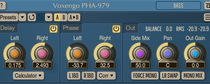
You can use the "Preset..." menu button to perform basic FXP/FXB
preset/bank management tasks. The "Set as default" menu option of
the "Presets..." menu allows you to assign the currently loaded program
to the default preset program. This default program will be loaded whenever
you enable a new instance of the plug-in or reset the current program. You can
use the "Reset default" option to restore the default factory
preset.
By pressing the "A|B" button, you can exchange the current and
shadow (or, alternatively, "A" and "B") programs.
The "Copy" button copies the current program to a shadow one.
Since only a single shadow program is used for the whole program bank, you
can use "A|B" button to copy programs. To do so, you first need to switch to
a program you want to copy and press the "Copy" button. Next, switch to a
program where you want to put the first program and press the "A|B"
button.
The "Reset" button can be used to reset the current program. All
parameters will return to their default states.
Knob control
To change a knob control's value, drag it with the left mouse button
and move it up or down. For finer adjustment, press the right mouse button
while dragging. Double-clicking on the knob with the left mouse button will
return the knob to its default position.
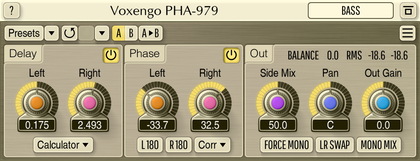
The "Phase L" and "Phase R" knobs can be synchronized with the SHIFT
and the ALT keys.
Parameters
Phase L and Phase R parameters specify the phase shift
value for the left and right audio channels, respectively.
Force Mono switch enables processing of the left audio channel
only. In some cases this may save some CPU resources.
You can use the Mono Mix switch to enable monitoring of the mono
mix of the left and right channels. This can help you to hear whether
phase adjustments you have made are mono-compatible or not.
Quality selector specifies the quality of the processing. The lower
the quality the more efficient processing is. However, lower quality
also offers a worse frequency bandwidth. For example, with the Low quality
setting, at 44.1 kHz, frequencies below 30 Hz will be considerably
attentuated.
Pan controls output signal panning. Please note that if the input
is a mono signal (or a forced mono signal) it will be also panned on the
output.
Out simply controls the output signal gain.
Pressing this button will display the plug-in's info screen. This screen
shows copyright and registration information, and contains the "Help" button
which opens the bundled HTML help file you are reading now.
Troubleshooting tips and additional
information
I am wondering if there is a set latency amount in ms or samples that
this plugin introduces to a track so I can compensate for it?
Latency is static 8192 samples (which is 0.186 seconds at 44100).
I don't like latency! Can you please get it to zero?
This is simply impossible, in the case of PHA-979.
I was wondering is the technology of this plugin is the same as in the
Little Labs IBP?
http://www.littlelabs.com/ibp.html
Probably PHA-979 is very close to IBP in the idea. However, since IBP is an
analog box, it is not linear-phase and thus it may add some additional
'analog' coloration, it may also shift some range of frequencies more than the
rest (it has a lo/hi switch for this). This may or may not be good in a
particular situation. PHA-979 is neutral in this respect. When applying
PHA-979 you can be sure nothing is destroyed in the process.
How PHA-979 is different from a simple delay plug-in?
PHA-979 halves the time shift if frequency doubles. For some it might be
interesting to know that at 90 deg. phase shift, PHA-979 works as a Hilbert
transformer. This makes this plug-in totally different to a delay plug-in.
You may see PHA-979 as a frequency-dependent delay. PHA-979 won't cure every
possible problem, but in a way it works, it covers more bases than
frequency-independent time shifting (time aligning). I.e. with the latter you
may still get some 'problem spots' while with PHA-979 you can minimize this
number to one or none.
More in-depth information:
Phase alignment should never be analysed without a time anchor. There
should always be a time anchor. Then, all phase/time changes should be
compared to this anchor. You may perceive the anchor as a soundwave with all
frequencies at unity at once. This anchor stays untouched while you are
adjusting another signal.
What time shift does to the signal relative to the anchor? For example, we
are at 96kHz, and shifting the audio for 500 samples (5 milliseconds). What
does that mean for the frequencies relative to the anchor sound? Let's
introduce 'phase shift per sample' value for each acoustic frequency. This
will be:
48kHz: 2*pi*48000/96000 = pi (means if we shift audio for 1 sample we get this 'pi' value shift for this '48kHz' frequency, relative to the anchor).
24kHz: 2*pi*24000/96000 = pi/2
12kHz: 2*pi*12000/96000 = pi/4
6kHz: 2*pi*6000/96000 = pi/8
etc.
So, when you are time-shifting your signal by 500 samples, frequencies in
it are shifted relative to the anchor by:
48kHz: 500*pi
24kHz: 250*pi
12kHz: 125*pi
6kHz: 62.5*pi
3kHz: 31.25*pi
1.5kHz: 15.63*pi
750Hz: 7.81*pi
375Hz: 3.8*pi
187.5Hz: 1.95*pi
You get the idea. Nobody knows what you'll get when you sum this shifted
signal with the anchor sound: comb filtering at the least. While process like
PHA-979 rotates ALL frequencies for the same phase amount, and it never
exceeds pi (unlike the ordinary time shift outlined above). Acoustically
speaking, PHA-979 does nothing to the signal since it preserves phase
linearity and basically a linear frequency response. Its effect can be heard
only compared to the anchor sound, when summed with that anchor sound. And the
result is simple: out of phase frequencies get reduction, inphase frequencies
get amplification, all in a very precise manner. This is the same as getting
an optimal balance between two sounds without equalization or
frequency-dependent phase-shifting.
Would PHA-979 be used more for individual instruments tracks, or more
for whole mixes?
PHA-979 is not totally usable for the whole stereo mixes unless you
specifically want to adjust the stereo-field. PHA-979 is meant to be used
during mixing, for aligning the most important instruments to each other:
drums to bass, acoustic guitars to each other, overdriven guitars to each
other, and so on.
If PHA-979 is just used on single sounds/instruments, would it only be
used on stereo sources?
It can be used on individual stereo sources like double-mic recordings.
But probably you will mostly use it on mono sources: vocals, guitars, bass,
drums. PHA-979 helps things to mix together better. When PHA-979 is being
used on a mono source, there is a special 'Force Mono' switch available
which you can enable to save CPU resources.
How can I set up PHA-979 to get a stereo track with the Left at -90 and
the right at +90 compared to the rest of a mix?
+270 (90+180) deg. is the same as -90 deg.
Should PHA-979 be used first or last in the effect chain?
I suggest to use phase shifting plug-in first in the chain.
Would the PHA-979 be the best tool for aligning the microphone bleed
that occurs when I record acoustic guitar and vocals at the same time?
Sure thing, PHA-979 can be used for such task, but since microphone bleed
has "distance" component (distance between two mics and two sound sources),
you may also need to time-shift the signal before applying PHA-979.
I'm slightly frustrated. I am trying the plug-in on one mic track from a
spaced stereo pair. I'm hearing no change at all.
You should always use two tracks - one unchanged and the other affected
by PHA-979 to evaluate the difference. When applying PHA-979 on one track
its effect cannot be heard, at all. The effect is heard only when you mix
the affected track with another track.
I would like to reproduce a sound coming "out" of the stereo field, like
sometimes when watching TV we feel that sound coming "extra wide". The source
is mono. Is this relative to phase?
I guess what you are describing as 'extra wide' can be created using
different phase shift on every channel, but you should also understand that
this kind of phase shift cancels out when stereo is mixed to mono. Getting
mono-compatibe 'extra wide' sound usually requires some additional processing
like delaying, chorusing, etc. It is possible to get such effect with PHA-979,
but the more your approach 180 degrees phase shift between channels, the less
'stereo compatible' your sound will be.
Happy Mixing!