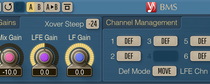
Preset management
You can use the "Preset..." menu button to perform basic FXP/FXB
preset/bank management tasks. The "Set as default" menu option of
the "Presets..." menu allows you to assign the currently loaded program
to the default preset program. This default program will be loaded whenever
you enable a new instance of the plug-in or reset the current program. You can
use the "Reset default" option to restore the default factory
preset.
By pressing the "A|B" button, you can exchange the current and
shadow (or, alternatively, "A" and "B") programs.
The "Copy" button copies the current program to a shadow one.
Since only a single shadow program is used for the whole program bank, you
can use "A|B" button to copy programs. To do so, you first need to switch to
a program you want to copy and press the "Copy" button. Next, switch to a
program where you want to put the first program and press the "A|B"
button.
The "Reset" button can be used to reset the current program. All
parameters will return to their default states.
Parameters
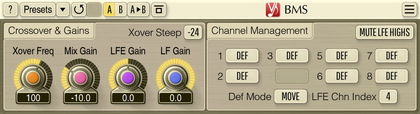
Cutoff parameter changes cutoff frequency of the low-pass filter,
which is used to extract the low frequency content.
Rolloff parameter adjusts the roll-off steepness of the low-pass
filter. Rolloff steepness is defined in decibels per octave.
LFE Gain parameter adjusts the loudness of the selected LFE
channel. Please note that this parameter does not affect the extracted
low frequency content being added to the LFE channel.
Mix Gain parameter adjusts the loudness of the extracted low
frequency content summed from all non-LFE channels before it is mixed to
the selected LFE channel.
The individual channel LFE management modes group of selectors choose
which management mode to use for each non-LFE channel. "Move"
means extracted low frequency content will be "moved" to the LFE channel
(meaning this content will be removed from non-LFE channel). "Mix" mode means
LF content will be mixed to the LFE channel without removing it from the
original non-LFE channel. "Mon" mode allows you to monitor the extracted low
frequency content of non-LFE channel (note that if "Mon" mode was selected in
at least one channel, all other channels will be muted). "Mute" mode mutes the
low frequency content of the non-LFE channel.
Default Mode switch selects processing mode for all channels with
the default (def) mode chosen.
LFE Channel switch selects which audio channel should be treated
as an LFE audio channel. Please note that the availability of channels depends
on your host audio application and its settings. In older hosts, you should
enable multi-channel support explicitly on the help screen (via
the Force Multich switch).