


Testimonial
I've only been using Voxengo mastering plugins for a short time, and already they have become a core inclusion in all of my new projects and in many of my old ones.

I've been able to re-release clearer, brighter, smoother versions of tracks that I thought could never be lightened-up.

My listeners have already sent me glowing feedback about the quality and spacialization of my new and re-released mixes, since having incorporated Voxengo products.

I use almost the whole array of products in different combinations in different productions with fanastic results...  though it's hard not to go overboard!

While some plugins are "too subtle to be heard", there's no question they modify the /feeling/ of the music; more solid, more smooth, and more enjoyable!

I plan to purchase the remaining pieces missing from my collection in the near future.

Thanks Voxengo, for sweet sounds and sweet deals.
CFX Music, Reston VA


Voxengo HarmoniEQ
Latest version: 1.5 - User's Manual - Forum: HarmoniEQ

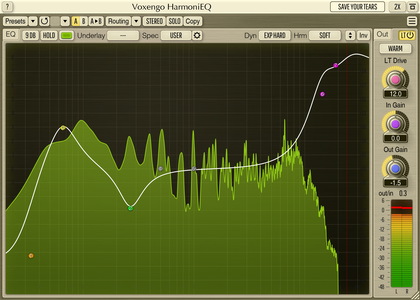
HarmoniEQ is a digital equalizer in audio plug-in form specifically designed to bring excellent and unconventional equalizing performance requiring little to none effort from the user.  We have called HarmoniEQ a harmonically-enhanced equalizer because harmonical enhancement it applies to the sound is an inherent element of its overall sonic quality.  Its special Boost mode coupled with a high-shelving boost produces a really stunning harmonically-rich and shiny sound.

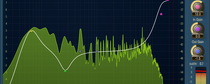
Since the easiness of tuning was one of our goals HarmoniEQ features a single control surface to control equalizer curve.  No knobs to have hassle with!  HarmoniEQ's control surface workflow implements our best findings in the area of "user-equalizer" interaction.  This allowed us to offer the user 3 shelving and 4 bell-shaped filters without making HarmoniEQ a hard-to-finetune device.  At the same time having 7 equalizer bands in total gives the user a lot of control over spectral details of the program material being processed.

As an added bonus HarmoniEQ features a special Woofer sound mode which allows you to make instant silky-smooth bass adjustments.  Another very useful element of HarmoniEQ is its control surface's frequency range which goes up to 35 kHz.  This allows you to make air boosts which are among the best in the industry.  It should be also noted that HarmoniEQ works best for frequency band boosts.  At the same time frequency band cuts tend to sound almost invisible which is a very important feature for an equalizer.

Features
  • 4 bell-shaped filter bands
  • Low-shelf filter band
  • 2 high-shelf filter bands
  • Four different EQ sound modes
  • Special Boost mode
  • Special Woofer mode
  • "A-to-B" comparisons
  • Factory presets
  • Mono-to-Stereo, Stereo-to-Stereo processing
  • Any sample rate is supported
  • Internal 64-bit processing
  • Native assembler DSP code

Requirements
  • Windows XP or any later 32-bit Windows OS
  • About 1 MB of harddisk space
  • 1+ GHz processor
  • Audio application supporting VST plug-ins

Demo Limitations
Processing stops for a moment every 45 seconds.

What's New
Version 1.5, 30-jan-2008
Access violation error on systems with >2GB memory solved.

Version 1.4, 13-nov-2005
  • "SoftP" mode implemented.  It is basically same as the "Soft" mode, but it skips the "special" processing HarmoniEQ performs in other modes.
  • Fixed keyboard 'stealing' when plug-in is used in Cubase SX 3.1.

Version 1.3, 24-jun-2005
"Phase" and "PhaseP" modes behavior fixed - they should sound better now.

Version 1.2, 18-apr-2005
Performance-oriented mode 'PhasyP' implemented.  It is suggested to use this mode together with the Normal quality mode to get the best CPU performance.

Version 1.1, 27-mar-2005
  • Quality switch added.
  • User interface's visual size increased.
  • 'Sound' switch added.  This switch can be used to affect equalizer's coloration. 'Phasy' sound mode coupled with the 'Boost' mode may give you a really colorful equalizer sound.
  • Linear phase mode implemented.  This mode affects internal oversampling only.  If in some cases original mode causes phasing problems when mixing different tracks it is suggested to enable linear phase mode.  This mode adds processing latency, though.  This mode can be enabled on the '?' dialog screen.
  • Overall sound has been changed a bit to provide a better sonic performance.

Version 1.0, 14-feb-2005
Initial release.

Version 1.0a, 01-feb-2005
Initial alpha release.


Copyright © 2002-2008 Aleksey Vaneev

Terms of Use - Privacy Policy