Voxengo - Sound with a Soul
Professional VST PlugIns and
AU PlugIns

Support Forums Shopping Cart
Equalizer Plugins Compressor Plugins Saturators, Guitar Amps All AU, VST Plugins Reverbs, Spatial Imaging Mastering Plugins Harmonic Enhancers Free VST, AU PlugIns Track Plugins Delay, Echo, Modulation Utility, Denoising, Analysis Drum and Cymbal Samples
A great real drum track for your song @ Voxengo studio - Hear examples now
Forums     Plugins     Soniformer
soniformer, beginners help needed

This topic was last updated 180 days ago, and thus it can be considered old.  Replying is disabled for this topic.

hello to all,

i just bought soniformer, well i must say it seems very powerfull,
but i need some help...
i'm new to voxengo plugins, so it's all new to me and i must say i'm a little confused and i don't know how to start...
the manual (both) didn't really help me, is there some tutorial video, or some kind of tutorial ?... some workflow example would be really nice.

if someone would have the patience to explain it a bit to me would be really great...

cheers and thanks

I suggest you to read the Q&A part of Soniformer's user guide - it includes guidelines for starters.

Something to start with:

- Select the 'Big Club Mix' preset
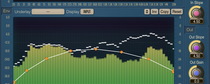
- Go to the "Out Gain" tab and adjust like it is an EQ
- Go to the "Width" tab and raise to taste

You can approach Soniformer as if it were en EQ if that helps you understand for now.  Another way to look at it is: you are attenuating compression for frequencies.

Hi there thank you for your reply, but i must say it confuses me even more ;),

'cause i can't find niether a "big club mix preset" or "out gain" tab or a "width" tab

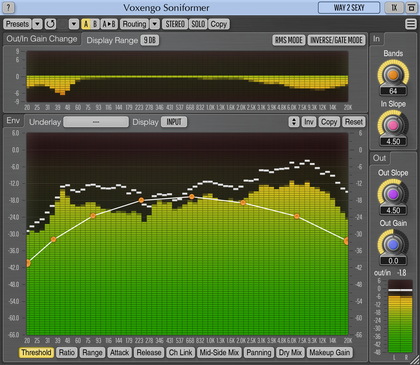
the tabs i have are: threshold, ratio, range, attack, release, chn linking, side chn mix, panning, makeup gain

the presets i have on the programs tab on top are: default, tape compression, deeper, spectral expander, overcompression , tape compression, open hights, depth, clubbing, lightness, spectral expander, default and flatter bass.

under presets inside the plugin ui, there are two categories session bank and factory rom with similar presets some more like mastering compression and smooth peak controll

it's a pitty that on the manual these presets are'nt explaint a bit, it would be much easier understand the plugin if their were.

sorry for my dumbness ;)

I guess John refers to previous version of Soniformer where that preset was present.

Presets are hard to explain, because they usually work differently on different material.

Well, the best thing you can do now is to experiment, load some presets, change the envelopes, and hear how it affects the sound.

Soundivad: Hi there thank you for your reply, but i must say it confuses me even more ;)
Yes, I am using Soniformer 2...

I downloaded vers.  3 and there are quite a few differences:

The new "Side Chn Mix" is similar to "Width".

"Makeup Gain" is similar to "Out Gain".

The "Makeup Gain" tab can still control like an eq (be careful of your levels).  I know that doesn't explain how or why, but the main point (as Aleksey suggested) is to experiment.
This topic was last updated 180 days ago, and thus it can be considered old.  Replying is disabled for this topic.

Copyright © 2002-2012 Aleksey Vaneev - Terms of Use - Privacy Policy - About Voxengo - Questions & Answers