Voxengo Elephant





Primary User Guide (PDF): English, Français, Deutsch, Русский язык
Applications
- Audio mastering peak limiter
- Stem, sub-mix, drum bus compressor
- Loudness maximizer
- Stereo, mono mastering limiter
- 7.1, 5.1 surround sound mastering limiter
- TPDF dither with noise-shaping
- DC offset removal filter
- EBU R128, K-system level meter
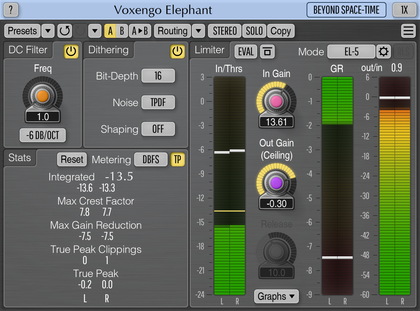
Voxengo Elephant is a mastering limiter AAX, AudioUnit, and VST plugin for professional audio and music production applications. The most remarkable feature of this signal limiter is its sonic transparency. Elephant brings sound limiting and loudness maximization without audible “fuzz” and “pumping” sonic artifacts.
Elephant is a highly competitive plugin for mastering applications: it features a variety of limiter modes that can be deeply customized, and a comprehensive set of level metering tools, including headroom estimation, EBU R128 and K-system metering. Elephant's built-in linear-phase oversampling is an important element in achieving high-quality peak limiting and loudness maximization without inter-sample overshoots (true-peak limiting).
Elephant limiter can be used for mixing and mastering of both stereo and multi-channel music and sound material, at any standard sample rate. Limiting process can be visualized both as gain reduction meter and real-time waveform graph.
Elephant, also featuring a DC offset filter, and a high-quality bit-depth converter with an optional noise-shaping, allows you to finish your music and audio productions with a spark!