Voxengo - Sound with a Soul
Professional VST PlugIns and
AU PlugIns

Support Forums Shopping Cart
Equalizer Plugins Compressor Plugins Saturators, Guitar Amps All AU, VST Plugins Reverbs, Spatial Imaging Mastering Plugins Harmonic Enhancers Free VST, AU PlugIns Track Plugins Delay, Echo, Modulation Utility, Denoising, Analysis Drum and Cymbal Samples
A great real drum track for your song @ Voxengo studio - Hear examples now
Forums     Plugins     BMS
BMS v2.0 - comments & suggestions

Reply    New topic    Search   

Hello, Aleksey,

I was searching for a 64bit Bass Management solution for quite a long time, therefore, I simply had to try your BMS v2.0 when it came out.  And since it does exactly what I need, I bought it almost immediately.  So, I thank you for this extremely useful plugin!

Nevertheless, I have two comments or suggestions:

1.  BMS v2.0 offers the following routing modes: 1in-1out, 1in-2outs, 1in-6outs, 2ins-2outs, 4ins-4outs, 6ins-6outs, 8ins-8outs.  At least, all these routing modes are selectable in Plogue Bidule. (As opposed to Cubase which - due to its rigid routing system - does not reveal the asymetric modes: 1in-2outs and 1in-6outs.) Unfortunately, the 1in-2outs mode doesn't seem to work since the second output does not produce any signal, although it's designated as the LFE channel.  And that's a pity because I suppose that the 1in-2outs mode could be useful in the situations when you want to separate the low frequency content from a mono source (or, when you want to keep the LF contents of a multi-channel source separated).  On the other hand, I can't see any use for the 1in-6outs mode, so I suggest that this mode should be disabled in order not to confuse users.

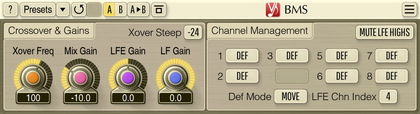
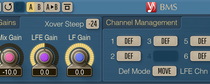
2.  In the plugin GUI, the button representing a channel designated as LFE is greyed out, however, its caption doesn't change.  I think that this behaviour is misleading because the original mode (Move, Mix, Mute, Bypass, Mon) has no sense for a LFE channel.  I suggest that the caption of a LFE channel should be changed to "LFE", in addition to greying it out.  This would make much more sense to me...

Thank you once again and best regards from Czechia! :-)
--
Miloslav

Thanks for your suggestions.  BMS expects number of inputs to be equal to the number of outputs.  This was done that way, because in practice there can be a lot of non-symmetrical IOs: 2 to 2.1, 5 to 5.1.  So, it was technically more universal to build BMS assuming symmetrical IOs.  Any non-symmetry should be first resolved by means of host routing.

Okay, I understand, but the variety of possible routing configurations is given by the plugin, whereas the host just selects the one which is most appropriate in a given context.  Therefore, maybe those unintended I/O configurations (1/1, 1/2, and 1/6) should be discarded so that BMS would not offer them to the host.  Of course, it's not a huge problem, but still... ;-)

Best regards
--
Miloslav

Well, the VST specification does not really have the option to provide a list of supported IO configurations.  The plug-in can define the maximum number of input and output channels it supports.  Usually the IO is assumed to be symmetrical.

Hello, Aleksey,

I must respectfully disagree... ;-) I'm quite sure that it's possible even in VST 2.4 to write a plugin which can specify its acceptable I/O configurations.  If you are interested in this, you can have a look at the AudioEffectX::setSpeakerArrangement method in the VST SDK documentation.  However, I understand that this topic might be out of your interests and priorities :-)

Best regards!
--
Miloslav

Yes, of course, we do use the setSpeakerArrangement() function - but it does not perform enumeration.  It's a "just in time" kind of function that allows plug-in to accept or reject a certain configuration.

But that's basically what I meant: it seems that some hosts (e.g.  Bidule) apparently enumerate all possible configurations against a plugin and then provide the user with a list of those configurations that have been accepted by the given plugin.  Therefore, by means of this function you should be able not only to specify the maximum number of I/O channels but also the particular I/O configurations.  And my point is that in Bidule the configurations 1/1, 1/2, and 1/6 are accepted by BMS - although they probably shouldn't be.

Best regards
--
Miloslav

Hello, Aleksey,

thanks for the update!  Just for your info regarding the I/O configurations: 1/6 really doesn't appear in the new (2.1) version anymore - which is good.  On the other hand, 1/2 is still there but it isn't usable since the second output is not functional in this configuration.

Best regards!
--
Miloslav

Simply ignore the 1/2 config.
Reply    New topic    Search   

Post your reply

You are not logged in.
Log in 

Copyright © 2002-2012 Aleksey Vaneev - Terms of Use - Privacy Policy - About Voxengo - Questions & Answers