


Testimonial
I just finished my first major mix using Warmifier.  I put this plug up there with the best tools in my digital or analog kit.  Its a lifesaver.  You say the drummer had brass that sounded like ass? - warmifier will sweeten it.  Say the vocal doesn't pop into the pocket?  Warmifier's vocal preset somehow makes it a lot more focused. ...  and I could go on.  The raves on gearslutz.com were correct.

Its so quiet and transparant that you can use it on a lot of tracks without any negatives as far as I can tell.  Ok, this is the joy of a guy with a new toy, but...  I would compare the effect on a track to something like the difference between a focusrite red and an api pre.  Subtile - but the api costs a thousand dollars more.  The Warmifier was 34 dollars.  I would have paid a lot more.  t.
Ted McConnell - producer/engineer


Voxengo Warmifier
Latest version: 1.6 - User's Manual - Forum: Warmifier

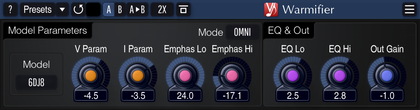
Warmifier is a special audio plug-in module which processes a signal in a way similar to analog valve equipment.  This means that you can achieve a classic valve warming effect right in your PC DAW environment.

Warmifier can be applied both to the complete mix and to the individual instruments.  You have several parameters at your disposal that allow you to control the strength and the color of the warming effect.  Also, you have several valve types to choose from.  Each valve type offers a different degree of coloration.

Features
  • Seven valve types
  • Two processing modes
  • High quality mode
  • "A-to-B" comparisons
  • Mono-to-Stereo, Stereo-to-Stereo processing
  • Any sample rate is supported
  • Factory presets
  • 64-bit internal precision
  • Native assembler DSP code

Requirements
  • Windows XP or any later 32-bit Windows OS
  • About 1 MB of harddisk space
  • 1+ GHz processor
  • Audio application supporting VST plug-ins

Demo Limitations
Processing is interruped with a short beep every 45 seconds.

Question
Why I do not hear any difference when using this plug-in?

You should understand that Warmifier performs subtle non-linear processing meaning that it mainly creates harmonics while not touching other aspects of the sound (like frequency balance or dynamics).  This in many instants makes evaluation a hard task even for a professional sound engineer.  To be sure what Warmifier does one should have enough experience with harmonical coloration and should use high quality monitoring environment.

If you are still not sure what Warmifier does please consider the following examples.  1kHz sine wave (at -6 dBFS level) has been processed with the Smooth and Crisp presets, respectively:


As you can see, a considerable harmonic content is being added during processing.

What's New
Version 1.6, 17-sep-2007
Access violation error on systems with >2GB memory solved.

Version 1.5.1, 05-jul-2007
Plug-in settings recall issue fixed.

Version 1.5, 20-jul-2005
Linear phase processing mode implemented.

Version 1.4, 05-dec-2004
  • Minor issues fixed.
  • Output clipping indicator added.  It will turn red if three sequential clip incidents were detected on any of the output channels.
  • "Auto quality" mode added.  The Auto mode selects the Normal mode during real-time processing; during offline/bounce processing the High quality mode is used.  Please note that your previously created presets may require readjusting of this parameter (if you previously used 'High' it will turn into 'Auto').

Version 1.3, 08-jun-2004
  • Minor bug fixed.
  • User interface updated (internally).  This should allow automation to run smoothly.

Version 1.2, 09-mar-2004
Maintenance release.  Several minor fixes, no new functionality.

Version 1.1, 13-feb-2004
  • GUI reworked.
  • FLT stage on/off switch added.
  • EQ stage pre/post/off switch added.
  • Using the preset management it is now possible to set the default program.

Version 1.0, 26-dec-2003
Initial release.

Version 1.0b, 23-dec-2003
Beta release.


Copyright © 2002-2008 Aleksey Vaneev

Terms of Use - Privacy Policy