|
Testimonial
Hi Voxengo folks! I just wanted to say thanks for the free stuff. I've been using your EssEQ, TubeAmp, TempoDelay (LOVE this one), and StereoTouch for a while now. I'm a VST 'hobbyist' who plays with this stuff for fun when I get a bit of spare time, but I'll never make any money from my 'tracks', I just enjoy playing for fun. Because of the free tools from people like you, I've been able to learn about things I always thought would be out of my reach - like mastering, synth programming, etc. I love all of this knowledge, and the ability to use my computer for stuff like this, and again, it's thanks to the amazing talent and generosity of people like you! I wouldn't be able to get involved in this world and learn this stuff if I had to pay for the commercial products, because I can't afford them and it's not a priority to me. Anyway, this is becoming a long message! I just wanted to say a big 'thanks', you have honestly played a part in changing my world.
Mike McGrath 'Laserguided' - Ottawa, Canada
|
Voxengo Redunoise
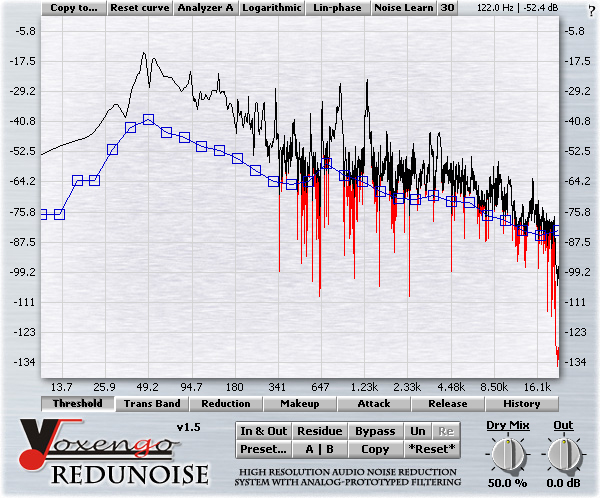
The latest plug-in Voxengo brings you is Redunoise. Redunoise is a high resolution audio noise reduction system plug-in. It delivers an unprecedented quality and offers the most comprehensive control.
Potentially, every person dealing with audio recordings works with noisy program material on several occasions. These situations tend to get painful since existing broadband noise reduction processes can be very complicated, because from the outset, results with them are not always pleasant. In a search for a better solution, we have developed our successful Redunoise.
Broadband noise is basically a very simple entity. For example, in audio editors, it is called `white noise', which you can generate for the given duration. Cassette and vinyl recordings have plenty of it. Sometimes recording to the line input of an audiocard also leaves a great deal of broadband noise, especially after normalizing. With such noisy audio sources, the natural desire is to reduce this broadband noise content while preserving all the necessary musical components, which is the most important part of the noise reduction process.
Redunoise uses advanced analysis and filtering approaches, offering an unprecedented audio analysis resolution and musically-sounding noise reduction filtering. Chances are you will like what Redunoise has to offer in the field of broadband noise reduction.
We must say, however, that Redunoise achieves its performance using a great deal of CPU resources. You should use at least a 1.3 GHz non-budget processor along with a relatively high audiocard latency. The second drawback we must stress is latency. Redunoise gives nearly 33,000 samples of latency. To lessen the unfortunate side of such huge latency, we have implemented analysis display time correction so that the actual audio playback is synced with the picture you see on the display.
Features
- High resolution spectrum analysis
- Analog-prototyped filtering
- Linear-phase filtering
- Real-time spectrum display
- Noise learn function
- Residual output monitoring
- Logarithmic/linear scale switch
- Multilevel undo for each parameter
- "A-to-B" comparisons
- Mono-to-Stereo, Stereo-to-Stereo processing
- Support of sample rates up to 96 kHz
- Demo factory presets
- 64-bit internal precision
- Native assembler DSP code
Requirements
- Windows 98 or any later Windows OS
- About 1 MB of harddisk space
- 1.3 GHz non-budget processor
- Audio application supporting VST plug-ins
Demo Limitations
Processing stops for a moment every 25 seconds.
Examples
You can check the following demo MP3 files in order to evaluate the broadband noise reduction quality Redunoise offers. (Original files were provided by Hans Kockelmans).
What's New
Version 1.6, 30-jan-2008
Access violation error on systems with >2GB memory solved.
Version 1.5, 19-jan-2006
Minor issue fixed.
Version 1.4, 15-jul-2005
Maintenance release.
Version 1.3, 06-jan-2005
- Minor issues fixed.
- "Copy to" function added. It allows you to copy envelopes of one type to another.
Version 1.2, 26-jul-2004
- Dry Mix control implemented.
- Minimum-/linear-phase switch added. Previous versions used only the minimum-phase filter design (which also can be called analog-prototype design).
- It is now possible to drag envelope segments, in addition to points.
- Envelope selection simplified - a set of envelope selection buttons is now available right below the control surface.
Version 1.1, 12-jan-2004
- Minor issues fixed.
- FXP/FXB preset manager implemented. It is available on the help screen.
- "Reset curve" bug fixed.
- "Select all" button was removed. You can use the right mouse button to select all points on the control surface.
- Frequency/dB read-out label added.
- Noise learn function implemented.
- Minor CPU usage optimizations.
Version 1.0, 12-oct-2003
Initial release.