Pro Audio Software

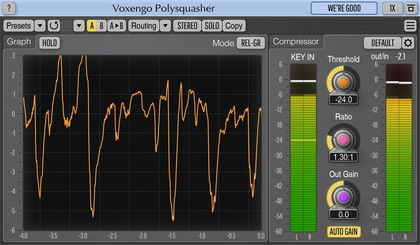
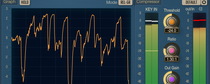
Voxengo Polysquasher Screenshot

Also may be of interest to you...

Analog-sounding audio plugins suite.
Transient-driven filtering system plugin.
Spectral audio mastering compressor plugin.
Dynamic equalizer plugin with spectrums.

Testimonial

I want you to know I am VERY happy with CurveEQ and Polysquasher.  In reality mastering is performed with expensive analog gear inside a special room.  These two plugins get me as close to mastering as I can get for someone who does home recording for his own enjoyment, only without spending the big dollars.  Nothing I have tried to date can come close to these plugins.  You do very good work and I wish you the best of success.
Robert Bruno


Voxengo Polysquasher


Latest version: 1.5
User's Manual: English

Transparent compression action is a cornerstone for any mastering compressor.  Transparency is necessary to preserve all existing elements in the mix, while compression itself is necessary to make the mix sound uniform to other mixes (tracks) and to make it sound more solid.  Artistic dynamics adjustment also requires a high degree of transparency from the compressor.  This allows the user to retain the original signal's clarity, while improving its dynamics.

Voxengo Polysquasher was designed with these things in mind.  It offers a highly transparent compression performance and a high level of control, with only a minimum number of adjustable settings available at users' disposal.  This makes it ideal for common mastering applications.

Its unique-to-date compression technology--which gives an unprecedented compression transparency--additionally allows the user to give a very special `touch' to the signal being processed.  It subtly tightens the low end and reveals the high end, creating a special `fresh' sound.

To sum up, this is a very interesting audio compressor plug-in.  Its compression effect can be slightly disorienting for the first time, since it differs from the other compressors greatly.  But after some time of use, its performance will be OK for you.

Features

  • Transparent sound
  • Real-time gain reduction scope
  • Variable knee
  • Three operation modes
  • High-pass side chain
  • "A-to-B" comparisons
  • Factory presets
  • Mono-to-Stereo, Stereo-to-Stereo processing
  • Sample rates up to 192 kHz supported
  • 64-bit internal precision
  • Native assembler DSP code

Requirements

  • Windows XP or any later 32-bit Windows OS
  • About 1 MB of harddisk space
  • 500+ MHz processor
  • Audio application supporting VST plug-ins

Demo Limitations

Processing stops for a moment every 45 seconds.

What's New

Verison 1.5, 04-may-2008
  • Parameter knobs can now be adjusted using the mouse wheel.
  • Access violation error on systems with >2GB memory solved.

Version 1.4, 09-dec-2004
Minor issues fixed, no new functionality added.

Version 1.3, 05-jul-2004
  • Maintenance update, fixes minor bugs.
  • Minor UI rearrangement - "Presets" menu moved to the main UI window.

Version 1.2, 20-dec-2003
  • Added "Dry Gain" parameter.  It allows you to get a little more control over compression.
  • FXP/FXB preset manager implemented.  It is available on the help screen.
  • A basic high-pass side chain implemented.  Side chain is useful for lowering the influence of the bass frequencies over compression.
  • A new monitoring option `Mon In' was added.  It displays the average input signal (absolute linear value) and the output signal.  This can help to visually analyze the gain reduction adjustment done by Polysquasher.  The `Mon Off' monitoring option allows you to disable monitoring.
  • Gain reduction display update frequency can be changed now on the help screen.

Version 1.1, 13-nov-2003
  • Added average gain reduction counter and a graph line.
  • Optimized DSP code.
  • A new "Mode 3" implemented.  This mode is a kind of improvement of the "Mode 2".  Mode 3 gives a much less "pumping" sound and allows transients to pass through.

Version 1.0, 19-aug-2003
Initial release.

Version 1.0a, 31-jul-2003
Initial alpha release.


Copyright © 2002-2009 Aleksey Vaneev