Pro Audio Software

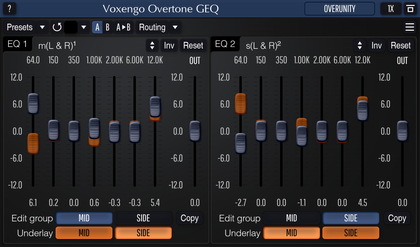
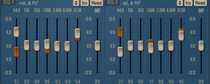
Voxengo Overtone GEQ Screenshot


Testimonial

Hi.  This is Robert from Serakos studio (Poland) www.serakos.pl.  I've just downloaded your GEQ and I'm absolutely stunning.  This plug-in exellent.  I'm using Pro Tools TDM with couple of nice outboard (Vintech, TL Audio, Focusrite, Apogee) and Wavelab for VST plugs.  I have to say that GEQ is one of the best eq (software and - or - hardware) and the M/S option is superb for mastering.  Thank you!


Voxengo Overtone GEQ

Latest version: 1.7
User Guide (PDF): English, Français, Русский
Primary User Guide (PDF): English, Français

Overtone GEQ is 7-band harmonic (overtone) graphic equalizer with multi-channel operation support (supporting up to 8 input/output channels, host setup-dependent).  Overtone GEQ offers extensive internal channel routing capabilities, and supports mid/side channel processing.

Beside equalizing, Overtone GEQ applies harmonic enhancement processing: it uses 7 harmonic enhancement modules, one for each EQ band.  This generates a complex harmonic coloration you will probably like a lot.

Overtone GEQ was designed to allow audio engineers to apply quick EQ shape adjustments together with adding a bit of harmonic richness to the audio material (mainly mixes and sub-mixes due to a comparably high processing load this EQ puts on a CPU).

Features

  • 7-band graphic equalizing
  • +/- 12 dB gain range per band
  • 2 graphic equalizer views
  • Multi-channel processing
  • Internal channel routing
  • Channel grouping
  • Mid/side processing
  • Complex harmonic coloration
  • Up to 8x oversampling
  • 64-bit floating point processing
  • Preset manager
  • Undo/redo history
  • A/B comparisons
  • Contextual hint messages

Compatibility

This plug-in can be loaded into any audio host application that conforms to the VST or AudioUnit plug-in specification.

This plug-in is compatible with Windows XP, Windows Vista (32- and 64-bit) and Mac OS X 10.4.11 and above (Intel and PowerPC) computers (2 GHz dual-core or faster processor with at least 1 GB of system RAM recommended).  A separate binary distribution file is available for each target computer platform for each plug-in format.

What's New

Version 1.7, 27-mar-2009:
  • Automation parameters were remapped.
  • Frequency and gain read-outs can be dragged for adjustments.
  • "Radial" knob mode can be now disabled completely.
  • "Off-Line Render" indication added.
  • A/B switch visual appearance changed.
  • WaveLab occasional crash fixed.
  • Host sample rate switch-related problem fixed.

Version 1.6, 13-dec-2008:
  • User interface code optimizations were implemented.
  • Channel groups can be named now.
  • "VST built-in refresh" global option added.
  • Quick main and routing preset selectors added.
  • The "Auto" oversampling mode was fixed for most hosts.

Version 1.5, 25-jun-2008:
  • Various minor fixes.
  • "Tablet mode" global option added.
  • "Auto oversampling level" global option added.
  • Virtual keyboard implemented.
  • Channel group output soloing implemented.
  • Superfluous "Copy To" button removed.

Version 1.4, 06-apr-2008:
  • "Oversmp" automation parameter added.
  • Instance name now persists between preset/program changes.
  • Group selectors now display groups that were actually used in the Routing window.
  • A possible cause of a rare occasional crash resolved.
  • Output routing arrangement changed - it is now possible to route the same internal channel to several outputs.
  • "Mouse wheel sensitivity" global setting renamed to "mouse wheel precision".

Version 1.3, 29-dec-2007
  • Equalizer curve scaling function.
  • Equalizer curve inversion function.

Version 1.2.5, 01-dec-2007
New beta release.  A lot of changes, presets made with previous versions of plug-in are incompatible with this and future version.


Copyright © 2002-2009 Aleksey Vaneev