

|
Testimonial
CurveEq has given me the ability to build up presets of dB(A), dB(B), dB(C) weighting curves widely used in buildings and industrial acoustics. Its accuracy after rendering noise files is of +- 0.1dB std deviation from top class1 expertise sonometer or analysis softwares of NVH market place. And an user friendly ergonomy that makes it easy to implement in any situation. Ahhh, the noise sounds better now...
Kind regards
Pierre
|
Voxengo CurveEQ
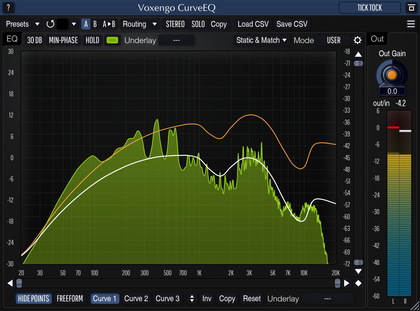
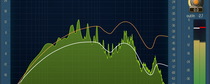
Voxengo CurveEQ VST is a professional WYSIWYG ("what you see is what you get") linear phase spline equalizer. CurveEQ shows you actual filtering information: the filter's frequency response, and both input and output FFT spectrums. You can actually see what the EQ is doing with the sound. This, in turn, allows you to get the best from your mix and your tracks. CurveEQ perfectly suits the needs of mastering, and in some cases CurveEQ is suitable for use as an in-track FX insert. Since CurveEQ is a linear phase equalizer, it offers a very easy tuning experience. This is especially true if you want to get your bass range right.
Besides the aforementioned features, Voxengo CurveEQ implements SpectruMatch spectrum matching technology that allows you to perfectly transfer a spectrum's slope from one recording to another. This allows you to `copy' a frequency balance of existing mixes so that other mixes that are still in the works will sound better. This technology also greatly helps in music disc mastering, since using it allows you to easily lessen any dramatic differences in the area of frequency balance between various tracks.
GearMatch technology allows you to transfer impulse responses of high-end analog audio gear to your digital audio, while allowing you to adjust frequency response freely. This results in a great improvement of sonic qualities. With this technology, all your tracks will sound unbelievably professional and vintage.
CurveEQ has a Vintage Processor which allows you to polish your sounds. Just turn it on and you will get a great deal of presence effect. Also, CurveEQ includes a compressing saturator. When it is enabled, the processed sound gets an additional vintage feel. You can use the saturator to create professional sounding vocal, guitar and bass tracks. In addition, it can be used on almost any audio material, especially during the mastering process as a vintage loudness maximizer.
Voxengo CurveEQ is a great addition to your existing professional plug-ins collection. But if you are just starting with EQ plug-ins, CurveEQ is a great learning tool, too - just see how spectrum gets equalized and compare it to what you hear.
Features
- Actual filter's frequency response plot
- Ease of tuning
- Free-hand EQ curve drawing mode
- Input and output spectrum plots
- GearMatch technology
- SpectruMatch spectrum matching technology
- Vintage processor and saturator
- Linear-phase and minimum-phase filtering
- Multilevel undo
- Skin support
- "A-to-B" comparisons
- Factory presets
- Mono-to-Stereo, Stereo-to-Stereo processing
- Support of sample rates up to 96 kHz
- 64-bit internal precision
- Native assembler DSP code
Requirements
- Windows 98 or any later Windows OS
- About 2.0 MB of harddisk space
- 500 MHz processor
- Audio application supporting VST plug-ins
Demo Limitations
Demo version mutes sound for one second every 25 seconds.
Notes
Since equalizer uses digital filtering, it issues a sample delay (latency). If you are working in multitrack environment then possibly this will not bother you since multitrackers usually buffer this latency so it is consumed, but if you are using live audio processing, plug-in will issue a 3072 samples latency. Additional 512 samples of latency will be added if saturator latency buffering is enabled.
Question
Could you explain the difference between the EQ provided in CurveEQ which seems to contain a large number of "bands" and the EQ offered by parametric EQs which seem to work with 5 to 7 bands which seem to have simpler curves across the spectrum. Is CurveEQ just superior to these or do those EQ's have specific advantages?
First of all, CurveEQ allows you to draw arbitrary EQ curves. Most parametric equalizers allow you to use some subset of EQ curves only (standard peaking, shelving filter curves), and this way it is sometimes difficult to get exactly what you want.
CurveEQ's technology not only allows you to draw EQ curve freely (it has both free-hand and control-point driven modes), but also gives you the opportunity to match spectrums (transfer EQ picture from one song to another).
Thus, comparison of CurveEQ and parametric EQs is not fully correct. Parametric EQs most of the time give a very strong character (if they are not linear-phase) while CurveEQ can work in a totally transparent manner.
As was already stated, CurveEQ is perfect for mastering applications where you don't need some very special character from the equalizer, but where you need control and transparency (plus CurveEQ can offer you a special character if you need it to). Existing users tend to say you can't go wrong with CurveEQ.
What's New
Version 2.6, 07-sep-2007
- Access violation error on systems with >2GB memory solved.
- Phono RIAA and RIAA/IEC compensation EQ curve presets added.
Version 2.5, 18-jan-2006
Name of the captured spectrum is now displayed explicitly when it was loaded or saved.
Version 2.4, 12-nov-2005
Fixed keyboard 'stealing' when plug-in is used in Cubase SX 3.1.
Version 2.3, 31-aug-2005
- 1. User interface redesigned.
- 2. Various minor issue fixed.
- 3. Graphics display CPU usage optimizations implemented.
Version 2.2, 14-apr-2005
- Crash happening when minimizing Cubase while the file selection dialog is open fixed.
- Master section preset restore in WaveLab fixed. Previously plug-in would not restore the original sound unless its UI is open.
Version 2.1, 20-feb-2005
- Minor issues fixed.
- Specturm capture tool now features a 'batch process' option which processes all wave files in the specified folder.
Version 2.0, 04-may-2004
- Various minor issues fixed.
- Implemented "mid-side" filtering mode which allows you to equalize mid or side channels independently of each other. The according switch is now located on the place where the filter design method selector was previously located.
- FXP/FXB preset manager implemented. It is available on the help screen.
- Kernel precision setting added.
- Spectrum capture tool implemented. You may invoke it using the spectrum file options menu. The capture tool allows you to acquire spectrums from uncompressed WAV files in a maximally efficient manner.
Version 1.9, 04-oct-2003
- Greatly increased SpectruMatch's and spectrum analyzer's accuracy.
- Changed default color of labels located on the GUI.
- Spectrum now updates smoother: values you specify for Spectrum Inertia do not allow ultra fast update speeds now.
- OutAvg monitoring mode now does not reset spectrum every 12 seconds. Instead, you can reset it manually with the right mouse button click.
- A new "2-P" filter mode added. This mode allows a more `open' sound in the higher frequency end.
- A new monitoring mode "OutPeak" added. This mode displays output spectrum's peak values.
- "Spread CPU Load" global setting added. When it is enabled it allows CurveEQ to have a more even CPU load. This, in turn, allows you to use more CurveEQ instances in a multitrack project.
- Increased speed of filter kernel rebuilding. This also allowed to increase the accuracy (smoothness) of the EQ curve.
- "Help Desk" info screen which describes all control buttons is added. You can invoke it by pressing the "?" button while holding the CTRL key.
Version 1.8, 27-jul-2003
- Thread-safety code reimplemented (this is a technical improvement only).
- Added "minimum-phase" filter mode. When this mode is enabled CurveEQ actually designs an analog style FIR-filter, without pre-echoing. This creates a non-linear phase filter which in fact sounds even more vintage.
- Implemented "spectrum type" global setting. Now if you feel more comfortable with 1/6, 1/3, 2/3, etc. octave spectral display you can use it instead of the default full resolution display.
- New gear options: LA C, MEQ A
- Increased visual size of the gear list.
- Preset enumeration bug/flicker present in some hosts fixed.
- "Max L/R" channel mode added. In this mode the louder level (for each spectral bin) of the two channels is used.
- "Freehand" mode implemented. In this mode you can draw EQ curve with the mouse freely. Please, read the help file for more information.
- "I" (invert) button added. This button inverts the EQ curve.
- Several reset options added, useful for the "freehand" mode.
- More denormalization countermeasures implemented.
- Undo and redo implemented. Undo has 32 levels and covers EQ curve changes only.
- "Band EQ" presets were replaced with different presets.
- SpectruMatch now allows to create the EQ curve with the specified number of control points (up to 60). Previously created presets and spectrum files can be seamlessly loaded/imported, with minimal differences. However, backward compatibility is not supported (you cannot safely load the newer presets with the earlier CurveEQ versions).
- Now all selected points will be deleted (or reset) on the left mouse button double-click.
Version 1.7, 24-mar-2003
- Several minor bugfixes.
- Performance of EQ engine was improved by at least 70%. This means one can run 70% more EQ plug-ins in the same project now. This allows to use CurveEQ plug-ins seamlessly even in audio track inserts.
- Many new exclusively-captured gear options added. Now CurveEQ has 63 gear options at user's disposal.
- Gear option list was upgraded to a scrolling list with arrows.
- "/" and "*" labels on buttons were changed to arrows.
- IMPORTANT ADDITION. Now it is possible to enable saturator's latency buffering. It can be enabled or disabled in "?" screen. Please, note that when this feature is enabled plug-in will issue additional 512 samples of latency while allowing host application to correctly buffer saturator's latency. If your host does not buffer plug-in latency at all, there is no reason in enabling saturator's latency buffering. Also, when this buffering is enabled, plug-in will consume slightly more CPU power. Saturator's latency buffering works only with sample rates up to 192 kHz.
- Help file updated. Added more user information on gear options and saturator.
- Added "pre gain" control which is showed on the control surface in the form of a horizontal dashed line. This control is useluf when saturator is enabled. To get this control visible 0 dB baseline must be dragged first. Please, note that dashed line snaps to 0 dB baseline if moved close to it.
- New factory presets added.
- Main skin was changed.
- Captured spectrum file options added.
- Now spectrums can be updated with inertia which means they will update smoothly and more meaningfully.
- Saturator now works before EQ section. This allowed a more precise control over what saturator does.
- Right mouse button on Gear options and VP selector can be used to swiftly switch to Off state and back to its original value. This is useful to monitor colouration change.
- Saturator algorithm was completely rewritten. New saturator can be also called a vintage limiter which does a common limiting and loudness maximizer work.
- Added "spectrum slope" global setting.
Version 1.6, 6-jan-2003
- Changed frequency scale to a more widely used LOG scale. Previously saved presets now must be additionally adjusted and captured spectrums recaptured. We are really sorry for this inconvenience, but that had to be done to increase overall quality of CurveEQ.
- Considerably increased quality of spectrum matching.
- Added dB scale selector.
- Added visible band selector. Now lows, mids and highs can be adjusted separately with a greater resolution.
- Visual appearance of all buttons has been changed. All selector buttons show a pop-up window now.
- Changed Out Gain control's scale to +- 30 dB.
- SpectruMatch controls' behaviour was slightly adjusted. Now two buttons used instead of three.
- Plug-in window size was changed. If you are using some VST adapter you will possibly need to rescan CurveEQ plug-in. Also previously built skins must be adjusted (those presented on the Voxengo website will be updated soon too).
- dB and frequency scale numbers were removed from the control surface to increase readability of both control surface and scale numbers.
- Now red-coloured points are treated as 'locked' nodes - only their gain can be changed. Their frequency can be adjusted when Ctrl is pressed, though. This is useful for creating presets with points at predefined positions for easier adjustments. Also, red-coloured points cannot be deleted with doubleclick, they return to 0 dB position instead. To delete red-coloured point it must be switched to a normal colour first.
- Added guidelines hide button.
- Updated help file a lot.
- New factory presets added.
- GUI engine rewritten. This resulted in flicker-free updating of visual components.
- Greatly improved accuracy of filter's frequency response plot.
Version 1.5, 20-dec-2002
- Greatly improved sound quality.
- Improved speed of frequency response curve refreshing. This resulted in a more softer editing experience.
- Control points now have more solid appearance.
- Mouse wheel can be used instead of "/" and "*" buttons.
- By doubleclicking and holding the right mouse button one can temporarily hide control points.
- Added "Vintage Processor". When it is turned on, sound receives a great number of harmonics and thus presence and overall "vintageness" is increased.
- Added built-in saturator. Saturator increases "vintage" feel of the sound while compressing audio signal.
- Updated help file.
- Added filter design method selector.
- You can colourize control points with a red colour by pressing the right mouse button.
- More presets added.
- GearMatch technology implemented.
- Several minor bugs were fixed.
- Buttons now work in two directions. When you press the left mouse button, state scrolls forward, but when you press the right mouse button it scrolls backward.
Version 1.4, 12-dec-2002
- Removed frequencies < 4.4 Hz from being displayed. This in turn resulted in an increase of horizontal graph resolution.
- Added two new factory presets.
- Implemented group edit of control points.
- Updated help file.
Version 1.3, 9-dec-2002
Skin support implemented.
Version 1.2, 6-dec-2002
- First public release.
- Several bug fixes and cleanups.
- Added response curve attenuation and amplification.
Version 1.1, 1-dec-2002
- Implemented SpectruMatch technology.
- Help file updated.
- Added "A-to-B" comparisons.
- Added output spectrum average monitoring.
Version 1.0, 26-nov-2002
Initial beta release.