|
This topic was last updated 180 days ago, and thus it can be considered old. Replying is disabled for this topic.
|
OldBlindJim
on Jun 18, 2007, 4:40pm:
I have a few of the plug-ins now and I'm very happy with there results.
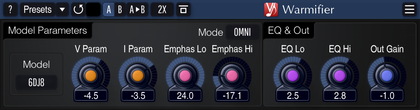
After I have inserted the Warmifier into a channel and load one of the presets I noticed that after I have closed the session and then returned that the setting in the Warmifier have change to all "0". My work around for now was to save the setting as a preset and reload after opening the session.
Any thoughts?
OBJ
After I have inserted the Warmifier into a channel and load one of the presets I noticed that after I have closed the session and then returned that the setting in the Warmifier have change to all "0". My work around for now was to save the setting as a preset and reload after opening the session.
Any thoughts?
OBJ
Aleksey Vaneev
on Jun 18, 2007, 5:15pm:
Which audio application are you using?
OldBlindJim
on Jun 18, 2007, 9:08pm:
I have SawStudio Lite. There is a folder where the VST are to be. All the other Voxengo plugs work fine.
OldBlindJim
on Jun 19, 2007, 1:41pm:
It's now saving the settings, but I had to go about it in a unconventional way.
Before I would insert the Warmifier into the channel with its default, setup my sound, finish my set, save session and close. When I would return the setting were gone.
Now, after I insert the Warmifier, I would setup and then Save Preset as Default, then remove the insert, close the session. Re-open the session, re-insert the Warmifier (which now has a new default settings). As a check, I then move one of the settings save the session and close. re-open the same session, open the Warmifier to see if the change held and now it holds.
I even tried this with both SawStudio Lite Demo and the Warmifier Demo and it does the same.
Before I would insert the Warmifier into the channel with its default, setup my sound, finish my set, save session and close. When I would return the setting were gone.
Now, after I insert the Warmifier, I would setup and then Save Preset as Default, then remove the insert, close the session. Re-open the session, re-insert the Warmifier (which now has a new default settings). As a check, I then move one of the settings save the session and close. re-open the same session, open the Warmifier to see if the change held and now it holds.
I even tried this with both SawStudio Lite Demo and the Warmifier Demo and it does the same.
Aleksey Vaneev
on Jun 19, 2007, 3:24pm:
Please write me via e-mail to info@voxengo.com - I'll send you a link to a newer version for you to try.
OldBlindJim
on Jun 19, 2007, 5:06pm:
New version try out 06-19-2007 9:55 am PST (Calif USA)
Done in Demo versions of Saw Studio Lite 4.0 and Warmifier 1.5.1
First test was to delete the present version 1.5 from my PC, install the 1.5.1.
Open a new session in SSL and insert the new Warmifier and open into the default settings.
Changed and noted all settings in the Warmifier. Ran the session, then saved session (did not save the Warmifier setting ) in SSL. Closed and Exit SSL. Reopened SSL, opened saved session, then opened Warmifier in this session.
Setting were saved.
Previous issue gone. Will run in full session tonight and get back with me results.
Thanks
OBJ
Done in Demo versions of Saw Studio Lite 4.0 and Warmifier 1.5.1
First test was to delete the present version 1.5 from my PC, install the 1.5.1.
Open a new session in SSL and insert the new Warmifier and open into the default settings.
Changed and noted all settings in the Warmifier. Ran the session, then saved session (did not save the Warmifier setting ) in SSL. Closed and Exit SSL. Reopened SSL, opened saved session, then opened Warmifier in this session.
Setting were saved.
Previous issue gone. Will run in full session tonight and get back with me results.
Thanks
OBJ
Aleksey Vaneev
on Jun 20, 2007, 1:17pm:
OK, thanks. I'll release this fix officially soon.
|
This topic was last updated 180 days ago, and thus it can be considered old. Replying is disabled for this topic.
|
Copyright © 2002-2012 Aleksey Vaneev - Terms of Use - Privacy Policy - About Voxengo - Questions & Answers