|
This topic was created before release of the latest product version, and it may contain details irrelevant to this version. Replying is disabled for this topic.
|
Lee Fox
on Jan 17, 2011, 2:20am:
I can successfully capture spectrums in both Cubase 5 and Wavelab 7.
The resulting equalizations are grossly exaggerated.
In other words: If the source signal is bass heavy, the new equalization from the capture is Very bass heavy. It does not match up with the source signal's spectrum.
I can supply a screen capture if that would be helpful.
What am I doing wrong?
The resulting equalizations are grossly exaggerated.
In other words: If the source signal is bass heavy, the new equalization from the capture is Very bass heavy. It does not match up with the source signal's spectrum.
I can supply a screen capture if that would be helpful.
What am I doing wrong?
Aleksey Vaneev
on Jan 17, 2011, 6:39am:
Spectrum capture does not take dynamics into consideration. So, if the source spectrum you are trying to match to a target spectrum contains infrequent bass notes, they may be boosted a lot if that target spectrum contains some constant bass content.
Lee Fox
on Jan 17, 2011, 4:07pm:
*nods*
I know Curve EQ looks at the "average" energy across the spectrum.
This is new behavior and I don't know if I'm doing something wrong or if the latest updates to C5 and W7 and causing the behavior.
May I send you a picture of what I'm seeing?
I know Curve EQ looks at the "average" energy across the spectrum.
This is new behavior and I don't know if I'm doing something wrong or if the latest updates to C5 and W7 and causing the behavior.
May I send you a picture of what I'm seeing?
Lee Fox
on Jan 17, 2011, 4:11pm:
I found a spot to upload it to.
http://4.bp.blogspot.com/_j97n2DE1WTc/TTR3x3c2ajI/AAAAAAAAAE4/CQwswRK6cc0/s1600/Captured%2BSpectrum%2BOverEmphasized%2B.jpg
Aleksey Vaneev
on Jan 17, 2011, 8:04pm:
This screenshot does not tell much, really. It only tells that the average power of the lower frequencies of the target spectrum was that much higher than those of the source spectrum. You could try using GlissEQ on two tracks and use its interchannel spectrum monitoring to see how track spectrums differ in dynamics.
Lee Fox
on Jan 17, 2011, 8:29pm:
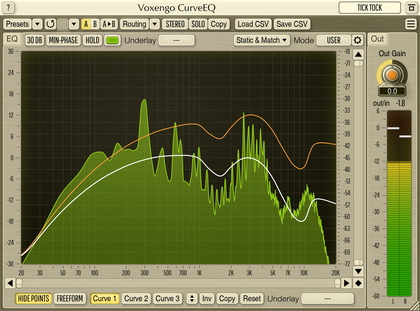
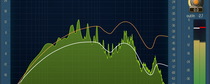
This is the display just prior to ending capture and then matching the EQ curve.
http://2.bp.blogspot.com/_j97n2DE1WTc/TTSzRAb7XpI/AAAAAAAAAFA/7gUo_wDY-No/s1600/Spectrum%2BDisplay%2BBefore%2BCapture%2B.jpg
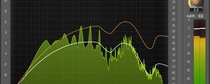
Here is the resulting EQ curve.
http://4.bp.blogspot.com/_j97n2DE1WTc/TTSzWwka3HI/AAAAAAAAAFI/mGSVcYjdlPo/s1600/Captured%2BSpectrum%2BEQ%2B.jpg
As you can see, the EQ curve does not match up with the overall curve of the source spectrum. It's is over exaggerated.
How do I fix that?
http://2.bp.blogspot.com/_j97n2DE1WTc/TTSzRAb7XpI/AAAAAAAAAFA/7gUo_wDY-No/s1600/Spectrum%2BDisplay%2BBefore%2BCapture%2B.jpg
Here is the resulting EQ curve.
http://4.bp.blogspot.com/_j97n2DE1WTc/TTSzWwka3HI/AAAAAAAAAFI/mGSVcYjdlPo/s1600/Captured%2BSpectrum%2BEQ%2B.jpg
As you can see, the EQ curve does not match up with the overall curve of the source spectrum. It's is over exaggerated.
How do I fix that?
Aleksey Vaneev
on Jan 18, 2011, 10:36am:
The spectrum display has a different scale to the EQ curve display.
Lee Fox
on Jan 18, 2011, 3:57pm:
I input Pink noise (which is essentially "flat" to the human ear) and captured the spectrum then I applied that captured spectrum to the same Pink noise.
I monitored the output using SPAN. Here are the results:
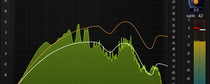
During capture (Curve EQ)
http://3.bp.blogspot.com/_j97n2DE1WTc/TTXDudhWWGI/AAAAAAAAAFQ/--x-1gGzSIg/s1600/Pink%2BNoise%2BSpectrum%2BCapture%2B-%2BCurve%2BEQ%2B.jpg
During capture (SPAN)
http://4.bp.blogspot.com/_j97n2DE1WTc/TTXDui2CwlI/AAAAAAAAAFY/J9xbKb-c-RA/s1600/Pink%2BNoise%2BSpectrum%2BCapture%2B-%2BSPAN%2B.jpg
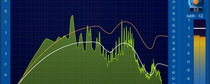
The captured EQ (Curve EQ)
http://3.bp.blogspot.com/_j97n2DE1WTc/TTXDu5qg3WI/AAAAAAAAAFg/rJR4FYBswqs/s1600/Captured%2BSpectrum%2B-%2BPink%2BNoise%2BInput%2B-%2BCurve%2BEQ%2B.jpg (The blue line is the input. The red line is the output. The "dots" are the EQ curve.)
The resulting output (SPAN)
http://3.bp.blogspot.com/_j97n2DE1WTc/TTXDvmA1NlI/AAAAAAAAAFo/5nXtb63KXvQ/s1600/Captured%2BSpectrum%2B-%2BPink%2BNoise%2BInput%2B-%2BSPAN%2B.jpg
How do I set up Curve EQ so that the captured EQ matches the source signal's spectral balance?
I monitored the output using SPAN. Here are the results:
During capture (Curve EQ)
http://3.bp.blogspot.com/_j97n2DE1WTc/TTXDudhWWGI/AAAAAAAAAFQ/--x-1gGzSIg/s1600/Pink%2BNoise%2BSpectrum%2BCapture%2B-%2BCurve%2BEQ%2B.jpg
During capture (SPAN)
http://4.bp.blogspot.com/_j97n2DE1WTc/TTXDui2CwlI/AAAAAAAAAFY/J9xbKb-c-RA/s1600/Pink%2BNoise%2BSpectrum%2BCapture%2B-%2BSPAN%2B.jpg
The captured EQ (Curve EQ)
http://3.bp.blogspot.com/_j97n2DE1WTc/TTXDu5qg3WI/AAAAAAAAAFg/rJR4FYBswqs/s1600/Captured%2BSpectrum%2B-%2BPink%2BNoise%2BInput%2B-%2BCurve%2BEQ%2B.jpg (The blue line is the input. The red line is the output. The "dots" are the EQ curve.)
The resulting output (SPAN)
http://3.bp.blogspot.com/_j97n2DE1WTc/TTXDvmA1NlI/AAAAAAAAAFo/5nXtb63KXvQ/s1600/Captured%2BSpectrum%2B-%2BPink%2BNoise%2BInput%2B-%2BSPAN%2B.jpg
How do I set up Curve EQ so that the captured EQ matches the source signal's spectral balance?
Aleksey Vaneev
on Jan 18, 2011, 5:31pm:
Please tell me the steps you are doing. When you are matching pink noise to pink noise you should get a flat EQ curve which makes me wonder what you are using as target spectrum.
Lee Fox
on Jan 18, 2011, 6:28pm:
I reset Curve EQ to 60 bands and tell it to capture the source.
I turn on the generator and let it run for many seconds until Curve EQ's display stabilizes.
I turn off the generator so Curve EQ is hearing silence and tell Curve EQ to stop capturing the source.
I then press M and tell it to match 60 bands and then S to stop and show the EQ curve of the source.
I turn on the generator and let it run for many seconds until Curve EQ's display stabilizes.
I turn off the generator so Curve EQ is hearing silence and tell Curve EQ to stop capturing the source.
I then press M and tell it to match 60 bands and then S to stop and show the EQ curve of the source.
|
This topic was created before release of the latest product version, and it may contain details irrelevant to this version. Replying is disabled for this topic.
|
Copyright © 2002-2012 Aleksey Vaneev - Terms of Use - Privacy Policy - About Voxengo - Questions & Answers