Introduction
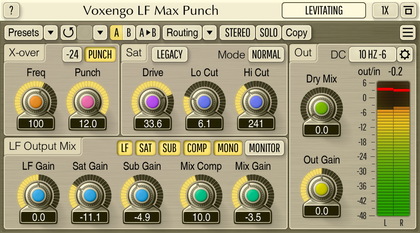
Voxengo LF-Punch PC VST plug-in is an FX processor for music and sounds
where low-frequency thump and punch are most welcome, and where distortion is
applied specifically to bring the bass kicks to life.
LF-Punch is a pretty specific FX not suitable for everything, but we felt
like there is a lack of such effects specially designed for serious
contemporary music producers.
In the essence, LF-Punch is able to give you the elements of low-frequency
FX usually associated with tape machines thus giving you a convenient
tool to apply smooth punch to your tracks and sounds whenever you need it.
LF-Punch plug-in dynamically emphasizes selected center bass frequency,
performs adjustable amount of phase-shifting and then applies smooth
distortion. Optional compression can then be applied to the resulting sound.
Note that LF-Punch first splits the broad-band signal into low- and
high-frequency bands and applies FX to the lower band only.
This FX can be used with a wide range of program material: various drum
tracks, bass tracks, contemporary music mixes: rap, trance, club music; even
rock music can benefit from LF-Punch's low frequency adjustments.
Voxengo LF-Punch features:
FX center frequency control
Phase-shifting module
Variable distortion
Built-in compressor
FX monitoring switch
Two processing modes
"A-to-B" comparisons
Mono-to-Stereo, Stereo-to-Stereo processing
All sample rates supported
Native assembler DSP code
Preset management
You can use the "Preset..." menu button to perform basic FXP/FXB
preset/bank management tasks. The "Set as default" menu option of
the "Presets..." menu allows you to assign the currently loaded program
to the default preset program. This default program will be loaded whenever
you enable a new instance of the plug-in or reset the current program. You can
use the "Reset default" option to restore the default factory
preset.
By pressing the "A|B" button, you can exchange the current and
shadow (or, alternatively, "A" and "B") programs.
The "Copy" button copies the current program to a shadow one.
Since only a single shadow program is used for the whole program bank, you
can use "A|B" button to copy programs. To do so, you first need to switch to
a program you want to copy and press the "Copy" button. Next, switch to a
program where you want to put the first program and press the "A|B"
button.
The "Reset" button can be used to reset the current program. All
parameters will return to their default states.
Parameters
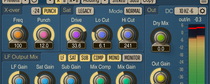
Center frequency selects low-frequency range to apply FX to.
Frequencies octave higher than the Center frequency would not be processed.
Strength parameter increases dynamics of the sounds around the
Center frequency. Please note that the higher the Strength is the louder short
low-frequency sound bursts become.
Phase applies additional phase adjustment over frequencies around
Center.
Distort works after the Strength and Phase processing stages.
In the Random mode its effect is very strange and is not fully controllable:
it interacts with Phase and Strength parameters together in an unpredictable
manner. In the Precise mode distortion stage is basically a wave-shaper
(hard limiter) with a variable knee: with this mode you have a maximum control
over distortion. Note that Distortion interacts with the adjustments done by
the Strength parameter. I.e. if the Strength is high along with the high
Distort parameter you will hear the most apparent distortion. By lowering the
Strength or the Distort parameter you may control the amount of distortion and
thus have the control over low-freq punch.
Hi Cut parameter filters out the higher frequency content in the
low-frequency signal after distortion is applied to it. This allows you to
get rid of excessive harmonic content being added to the output.
Compressor is applied right after distortion stage finishes. This is
a feed-forward compressor with a high attack and a fast release (release time
is higher than the attack time, though). This allows to suppress excessive
low-freq peaking while still maintaining good punch.
LF Gain adjusts FX signal's gain.
Mode button selects processing mode. For more information, please
read the details about the Distort parameter.
Monitor switch enables monitoring of the FX signal path only,
without higher frequencies which are unaffected.
Bypass switch enables monitoring of the original unprocessed sound.
Please note that you can monitor both original broad-band and
FX path low-frequency signal.
LF Mono switch enables mixing of the low-frequency signal to mono
before the processing is peformed. This switch can be used as a quick Mid/Side
management option for low-frequencies which usually should not carry much
stereo information.
You may use Precise mode and Distort control to get that 'clipping'
control. And the Compress parameter for the final level compression.
Phase-shifting module can apply some phase coloration to the low-freq
sound - this can be useful at times.
Distortion is applied to the whole LF band.