



Testimonial
This thing gives me so much control in mastering it is just a dream.
The idea of drawing envelopes for all those functions is insanely brilliant, it's just so easy to make stuff sound GOOD!
I love the way i can draw an envelope to adjust my compression ratios thoughout the spectrum!
It's also perfect for fine tuning rough mixes and evening things out in a very fast and efficient way when someone wants a rough to listen to.
A wonderful tool.
Jim Holland (Seaweed Studios)


Voxengo Soniformer
Latest version: 2.6 - User's Manual - Forum: Soniformer

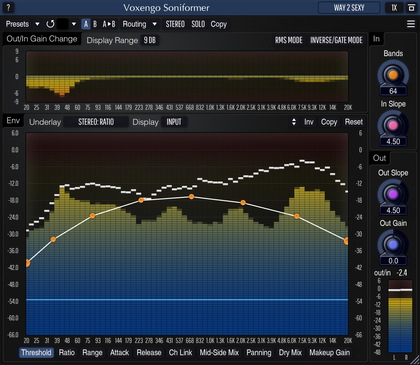
Voxengo is pleased to introduce the next major version of plug-in called Soniformer.  This plug-in is an innovative mastering tool for DAWs (Digital Audio Workstations) that allows the user to form and reform the sonic structure of any sound material.

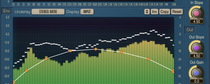
The main idea behind Soniformer is a spectral balance.  A perfectly balanced mix can be seen on a spectrum analyzer as a smooth spectral curve with minimal number of peaks and notches.  There can be some deviations from this rule, but generally it always applies.  Soniformer uses compression to adjust the spectral balance of any sound material being processed in a way that its spectral curve fulfills the aforementioned rule.  Thus, Soniformer could also be called a spectral compressor.

Every parameter of Soniformer is defined by means of a graphic envelope which is freely-modifiable and which may contain up to 32 control points.

Soniformer implements both compression and expansion, which allows a variety of different sound structures to be created, including classical tape compression, unobtrusive bass expansion, and general mix compression.  And it all sounds pristine!  One could say that Soniformer brings a classical warm analog compression to a digital workstation.  This is true, because even at very subtle compression settings, Soniformer brings a strong feel of a professionally balanced mix.  In fact, Soniformer allows the user to perform professional sounding mastering in a budget environment.  Spectral balance is almost a universal thing, and every mastering engineer has to master it, while Soniformer brings it the easy way.  Soniformer's adjustments of the spectral balance actually reveal details of the mix being processed.

Features
  • Spectral compression technology
  • Envelope-driven parameters
  • 32-band spectrum analyzer
  • Mid/side processing
  • Gain change meters
  • Stereo linking envelope
  • Stereo width envelope
  • Stereo pan envelope
  • Two level detector types
  • "A-to-B" comparisons
  • Factory presets
  • Mono-to-Stereo, Stereo-to-Stereo processing
  • Sample rates up to 192 kHz supported
  • Native assembler DSP code
  • 64-bit internal precision

Requirements
  • Windows 98 or any later Windows OS
  • About 1 MB of harddisk space
  • 1 GHz processor
  • Audio application supporting VST plug-ins

Demo Limitations
Processing stops for a moment every 45 seconds.

Examples
Here you can listen to several working results of Soniformer.  The following examples were made using the internal parabolic curve compensation.


What's New
Version 2.6, 12-sep-2007
Access violation error on systems with >2GB memory solved.

Version 2.5.1, 24-aug-2006
Fix: "OutGain" envelope now does not affect the level meters when no "O.Gain"
stage is available in the processing order sequence.

Version 2.5, 18-feb-2006
  • Knob mode panel state is now restored correctly after closing plug-in's window.
  • Order mode buttons can be now switched to Off state and back with the right mouse button.

Version 2.4, 14-sep-2005
  • Ratio indicators resolution has been increased by 1 decimal point.
  • Copy envelope function issue fixed.
  • Visual interface size increased.
  • Processing blocks reordering introduced instead of "Width Env", "Pan Env" and "C.Disable" options.
  • Alternative envelope editing mode implemented in form of a panel of knobs.

Version 2.3, 07-dec-2004
  • Panning envelope added.
  • Compression disable switch added.
  • Maximal number of control points in envelopes increased to 32.
  • Minor performance optimizations.
  • Output clipping indicator added.  It will turn red when three sequential clip incidents were detected on any of the output channels.
  • Narrow band sweeping function implemented (hold the CTRL key and the left mouse button).  This function allows you to listen to a selectable narrow band in order to detect various sonic artifacts which then can be tamed by Soniformer.
  • Input-output level difference counter added.  This counter can be helpful when you are adjusting the Out knob in order to accomodate level difference between the input and output signals introduced by the processing.

Version 2.2, 26-may-2004
  • Minor bugfixes.
  • Mid/side processing modes implemented.

Version 2.1, 07-apr-2004
  • Weighting options added.  Because of this the global "Parabolic" switch has been removed. "Internal" weighting option now substitutes for the "Parabolic" switch.
  • "Spectum Speed" global selector added.  Now, you can choose a more comfortable spectrum update speed.
  • "Snapping" global option added.  When this option is enabled, envelope nodes will be snapped to centers of the spectral bands.

Version 2.0, 25-feb-2004
  • Complete rewrite of the user interface and program internals.  This newer version does not support previous version's presets and so its DLL is named VoxengoSoniformer2.DLL allowing you to use previous version DLL, too, thus simplifying migration.
  • Help file updated.
  • FXP/FXB preset manager implemented.
  • Sample rates up to 192 kHz now supported.
  • New features like stereo linking and stereo width envelopes.

Version 1.2, 25-aug-2003
  • Added "Env" detector type.  Previously Soniformer used "Peak" detector only.
  • To prevent registered trademark violation, Sonic Finalizer is now known as Soniformer.

Version 1.1, 10-jun-2003
  • All control knobs are now linked (only Threshold knobs were linked before).
  • Help file updated.
  • Added "Fluffy" control.  By default Soniformer works in a fluffy mode.  You can now turn it off to make Soniformer work in a more predictable and common way.
  • Gain change meters added.
  • "Link" control implemented which allows to preserve stereo-field.
  • Compression behaviour was changed.  Previously created presets must be adjusted now.  The most simple way to adjust the previously created presets is to swap their Attack and Release.  E.g.  if Attack=10, Release=300, after adjustment: Attack=300, Release=10.  If expansion ratio was used, both attack and release do not need to be changed.
  • Several new presets added.
  • Preset enumeration bug present in some hosts fixed.

Version 1.0, 15-mar-2003
  • Denormalization issue fixed.
  • Factory presets implemented.
  • Mono support implemented.
  • Help file added.

Version 1.0a, 14-feb-2003
Initial alpha release.


Copyright © 2002-2007 Aleksey Vaneev

Terms of Use - Privacy Policy