

Pro Audio Software

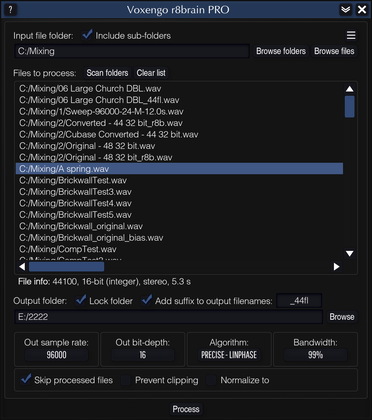
Voxengo r8brain PRO Screenshot

Also may be of interest to you...

Tube/valve warming audio plugin.
Dynamic equalizer plugin with spectrums.
Audio mastering limiter (maximizer) plugin.
Vocal channel strip audio plugin.

Testimonial

Well this is a very strange point of view I have achivied after trying out
the Voxengo mastering tools.They sound superb in confront to others.I don't want to repeat myself but Soniformer and Elephant have given the results of a TC Electronic master (or even better).So I now look at the audio world in another way -There are some things in life that money can't buy,even your talent and devotion to the audio world- Your intelectual property should cost more and more but you kept this simple.Well I am astonished with Curve EQ and Lampthruster which gave us the ability to throw some tube racks out the window.And finaly r8brain Pro and Free that helped to over come the need to by those expensive and bother some converters that seems to me just take up space and confort.A big thank you from a young composer but very careful to sound quality and final products.You made it people transparency,clarity,punch,artistic design,warmth and consistency will have the VOXENGO stamp over them for a long time
Dreeny Iscmakou


Voxengo r8brain PRO

Latest version: 1.5
User's Manual: English

r8brain PRO is a professional sample rate converter designed to deliver an unprecedented sample rate conversion (SRC) quality.  Unlike many existing SRC algorithms available on the market, r8brain PRO implements sample rate conversion processing in its full: interpolation and decimation steps without exploiting any kind of simplifications; the signal is first resampled to a least common multiple sample rate which makes conversion perfect.  In the core of the SRC algorithm, we use the convolution methods of our Pristine Space convolution processor which is known for its highly precise convolution processing.  This gives us high sample rate conversion quality in combination with comparably small processing times: sample rate conversion without compromises!

Like many existing SRC programs, r8brain PRO offers you a linear-phase conversion mode.  But more importantly, you also have an option of using the minimum-phase conversion mode, which finally brings SRC with true analog qualities to affordable digital audio workstations: in this mode, r8brain PRO works like an ideal digital-to-analog converter followed by an analog-to-digital converter to resample the audio.  This eliminates pre-ringing associated with linear-phase designs, while introducing only a minimal amount of phase coloration.

r8brain PRO can read mono, stereo and multi-channel files in both WAV and AIFF file formats, creating 16-, 24- and 32-bit mono, stereo and multi-channel WAV files in fixed and floating point formats.  EBU BWF (broadcasting) extensions, extensible wave format, sample loops and textual data residing inside the file are also supported.  For the sake of convenience, r8brain PRO allows you to perform batch conversions in a convenient manner.

r8brain PRO's bit-depth conversion is limited to flat dithering.  We have decided not to implement noise-shaping dithering because pro audio production software available on the market usually offers the user noise-shaping dithering of some kind already.  We also based our decision on the fact that the sample rate conversion process often adjusts peak structure of the original program material, thus, in many cases, making a subsequent peak-limiting a necessity.  To prevent output audio from clipping we have implemented a level normalization feature.

Light Version

You may register to obtain either a Full or Light license of r8brain PRO.  The Light version offers you a linear-phase conversion mode and up to 48 kHz output sample rates only while supporting all input sample rates.  The Full version offers you all features of the software.

Features

  • Reads 8-, 16-, 24-, 32-bit PCM and IEEE files
  • Reads both WAV and AIFF files
  • Writes 16-, 24-, 32-bit PCM and IEEE WAV files
  • Multi-channel file support
  • Extensible wave format support
  • EBU BWF extensions support
  • Linear- and minimum-phase modes
  • Batch support
  • Automatic normalization
  • Supports all standard sample rates

Requirements

  • Windows XP or any later 32-bit Windows OS
  • About 1.5 MB of harddisk space
  • For best performance a fast processor is required

Demo Limitations

The demo version of r8brain PRO allows you to evaluate all features of the software, but its conversion is limited to the first minute of an audio file.  The demo version does not support batch conversions.

What's New

Version 1.5, 25-aug-2006
  • Last selected input folder is now saved correctly between program sessions.
  • 8-bit output bit depth option added.

Version 1.4, 15-may-2006
  • A significant performance speed-up when convering to/from 44.1, 48, 88.2, 96 kHz rates (compared to all previous versions).
  • Problem with a "slower than version 1.2" conversion performance from/to 44.1 and 48 kHz rates fixed.
  • r8brain PRO now recognizes "abc.wav.txt" file that specifies broadcast extensions information (in CVS format) that corresponds to "abc.wav" file.
  • r8brain PRO can now convert files using command line.
  • r8brain PRO now uses a common 2LSB TPDF dithering.

Version 1.3, 24-jan-2006
  • New "Ultra-steep" mode implemented.  It offers an excellent bandwidth (less than 1.5% high-frequency rejection) at the expense of conversion time.
  • A variety of non-standard sample rates are now supported.
  • Minor issue fixes.
  • It is now possible to drag & drop WAV files to r8brain PRO short cut in order to open r8brain PRO with these WAV files selected for conversion.
  • It is now possible to change the default suffix of the converted files.
  • Now uncompressed AIFC files can be read as well.
  • Minor conversion quality improvements implemented.

Version 1.2, 13-jun-2005
  • 'Pause' button implemented.  This button can be pressed during processing to temporarily release CPU resources, without stopping the whole conversion process.
  • Total progress indication now updates smoother.
  • Normalize peak dBFS option added.

Version 1.1, 04-jan-2005
  • BWF data storing related issue fixed.
  • Added "Original" option for the output bit depth.  Use this option if you do not need to change bit depth of the original file.
  • "Do not add 'r8bp' suffix" option added.  Use this option if you want to preserve original file names.  Please note that this option may overwrite the existing original files.

Version 1.0, 01-nov-2004
Initial release.


Copyright © 2002-2009 Aleksey Vaneev