Introduction
Analogflux is a suite of PC VST audio processing plug-ins designed to
deliver the sounds of the analog days. In the core of these processors we have
extensively used convolution processing to match the response of the original
analog gear. This suite consists of TapeBus, Delay, Impulse, Insert and Chorus
plug-ins.
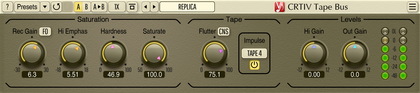
The TapeBus plug-in recreates characteristic elements of the reel-to-reel
tape sound. This includes saturation, modulation noise and smearing effects
which are known for the 'analog' feel they bring to any audio recording.
This plug-in also applies a selected impulse response taken by us from the
existing tape machine.
The Delay plug-in models the sound of an old analog delay module. Beside this,
it offers the user modern two-tap delay controls, including separate pre-delay
and feedback delay controls which together allow you to build ping-pong kinds
of echo soundscapes. The plug-in also contains a cross-feedback path between the
channels, which enables you to create some even more complex echo structures.
Our delay module also offers you a BPM control with the ability to sync it to
the host's tempo changes. And most importantly, you can choose
the response of the delay module: from moderately bright to endlessly
dark, taken from the real analog delay module.
The Insert plug-in is our attempt to create a simple processor which could
be inserted on any track to make it sound less digitally-focused and thus
make it sound warmer. Beside the severe phase smearing this plug-in introduces
it also allows you to apply modulation noise of selectable strength.
This processor while sounding subtle at the first glance can do miracles at
taming overly sharp transients.
The Impulse plug-in is a greatly simplified version of our Pristine Space
8-channel convolution processor. The Impulse plug-in is a two-channel
convolution processor designed to be used on channel inserts and reverb sends.
It allows you to load impulses stored in WAV and AIFF audio files, and also
offers you a selection of built-in impulses including vintage spring
reverb.
The Chorus plug-in offers you a stereo chorus plug-in which features
8 operators (4 for each output channel), creating together a really huge and
convincing chorus applicable to vocals, guitars and synth
instruments.
Analogflux Suite features:
Tape simulation plug-in
Analog delay plug-in
Convolution processor plug-in
Analog insert plug-in
Chorus plug-in
Factory presets
"A-to-B" comparisons
Mono-to-Stereo, Stereo-to-Stereo processing
All sample rates supported
64-bit internal precision
Native assembler DSP code
Preset management
You can use the "Preset..." menu button to perform basic FXP/FXB
preset/bank management tasks. The "Set as default" menu option of
the "Presets..." menu allows you to assign the currently loaded program
to the default preset program. This default program will be loaded whenever
you enable a new instance of the plug-in or reset the current program. You can
use the "Reset default" option to restore the default factory
preset.
By pressing the "A|B" button, you can exchange the current and
shadow (or, alternatively, "A" and "B") programs.
The "Copy" button copies the current program to a shadow one.
Since only a single shadow program is used for the whole program bank, you
can use "A|B" button to copy programs. To do so, you first need to switch to
a program you want to copy and press the "Copy" button. Next, switch to a
program where you want to put the first program and press the "A|B"
button.
The "Reset" button can be used to reset the current program. All
parameters will return to their default states.
TapeBus plug-in controls
Rec Gain - record gain (drive). The higher this parameter is
the more saturation (distortion) is happening.
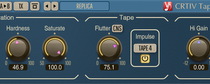
Saturate - a kind of wet/dry mix control. Affects saturated part
of the signal only since standard wet/dry mixing is not possible as tape
response introduces too many phase adjustments. This parameter can be also
perceived as a 'saturation softening' parameter.
Lows - low frequency peaking filter boost (pre-saturation),
Highs - additional high frequency shelving boost (pre-saturation).
These two paramters resemble a simple equalizer placed before saturation
stage.
Out - output gain of the plug-in.
Curve - saturation curvature. The higher the value, the steeper the
saturation curve, and thus the more 'screaming' the saturation is.
This parameter affects saturation transfer function and thus harmonic
content of the distortion, especially on moderate distortion levels.
EM Freq/Gain - center frequency and gain for the pre-emphasis
high-shelf filter. The higher the Gain value, the earlier the
higher frequencies get affected by saturation. The pre-emphasis filter
preserves lower frequencies from distorting at the expense of
adding intermodulation noise and oversquashing the higher frequencies.
Plug-in also features a simple distortion meter which is located inbetween
the Out and Curve controls.
You may use the global switch "Tape Off" on the info screen (press the
"?" button) to disable tape impulse coloration stage completely. This will
disable selection of the Tape type and will eliminate latency in the plug-in.
A global setting is one that affects all plug-in instances in all audio host
applications. Global setting takes effect only after the plug-in instance is
reloaded or audio host application is restarted.
Delay plug-in controls
This is a stereo delay plug-in with smooth delay length changing. The most
important feature of this delay is the use of convolution processing
in its signal path, which applies an impulse response recorded from a
real analog delay.
BPM - beats per minute.
BPM Sync - enable BPM sync to the host's tempo.
BPM Mult - BPM value multiplier.
Rolloff - selects which analog delay impulse response to use.
Works like a low-pass filter selector.
Dry Gain - amount of the dry signal to mix into the output.
Delay L/R - initial delay length modifier.
Length L/R - feedback delay length modifier.
Feed L/R - feedback (cross-feedback) amount.
Gain L/R - output gain for the delay channel.
The Delay, Length, Feedback, Feed and Gain controls for the channels can
be linked by holding the SHIFT (absolute sync) and ALT (relative sync)
keys.
NOTE: This plug-in has limitation on the
feedback delay time: it cannot be lower than some internal pre-set value.
This means that if you start using too 'quick' delays, you may not get
what you want. The same applies to very long feedback delays: this plug-in
allows you to have up to 2-second feedback delays only.
Insert plug-in controls
This plug-in was designed to transform audio stream and make it sound much
less focused across the whole spectrum. Generally this may give a somewhat
inferior sound, but in some cases it can give a smoothness not otherwise
achievable. The plug-in also applies switchable modulation noise which is
usually available when working with any tape machine.
ModNoise - amount of modulation noise.
F.Mono - forces processing of the left channel only.
Impulse plug-in controls
The impulse plug-in was designed to be used as a send FX or as an insert FX
when one needs a 100% wet output (e.g. when using pre-amp or speaker cabinet
impulses, or reverb impulses on sends). Impulse plug-in is bundled with
internal impulses. Use the 'File' button to load any external WAV or AIFF
impulse. When the 'X' button is pressed, the plug-in unloads any external
impulse and loads one of the internal impulses. You may press the bar with
impulse's name to bring the impulse selection list.
The status line shows the parameters of the loaded impulse: number of channels,
sampling frequency ("*" if impulse's sample rate differs from the host sample
rate), bit-depth and length in seconds.
The 'Latency' label shows the amount of latency reported to the host by
the plug-in. You can adjust the latency of the plug-in by pressing the '?'
button. Please note that it can be benefical to use higher latency whenever
possible as it allows plug-in to lower the CPU usage.
In->Mono - forces mixing of the incoming audio to mono.
F.Mono - forces processing of the left channel only.
Bypass - enables processing stage bypass mode.
Predelay - amount of delay to insert to the output (useful for
reverb sends).
Out - output gain control.
Chorus plug-in controls
Delay - how much chorus signal is delayed.
Freq - frequency of chorus modulation.
Depth - depth of chorus modulation.
Wet - wet (chorus) signal gain.
Wet Pan - panning of the wet (chorus) signal.
Dry - dry (original) signal gain.
Mode button selects chorus algorithm. The 'Clean' mode offers you a
classic clean chorus sound. 'Vintage' mode offers you a chorus sound with
modulation noise applied to each chorus operator (voice). This mode consumes
more CPU power but at the same time provides a more pleasant chorus sound with
an old vintage color to it.
In->Mono - forces mixing of the incoming audio to mono.
F.Mono - forces processing of the left channel only.
Quality button is used to switch between the normal and the
high-quality processing modes. The high-quality processing mode internally
uses a two-times higher sample rate, performing 2x oversampling. The high
quality mode uses about two times more CPU resources. The "Auto" quality mode
disables oversampling in the normal real-time plug-in operation and turns
oversampling on during the offline audio bouncing. Please note that the "Auto"
mode may not work properly in all hosts (if the host does not report back when
it enters the offline processing mode).
NOTE: when a mono signal is being processed (or when the F.Mono switch is
enabled), the plug-in creates an 8-operator mono chorus with a very 'thick'
sound.
NOTE: The Wet and Dry knobs can be
synchronized with the ALT.
Analogflux Impulse should be a little more efficient than PS (because it
does not feature Dry knob which needs additional math multiplication and
addition), but not much more efficient.
TapeBus is completely different plug-in in comparison to those two, so
no direct comparison can be made. Indeed, TapeBus may give you 'in your face'
kind of sound.
Yes, the impulse will be resampled. But bear in mind that resampling
applies low-pass filtering and so frequencies between 20-22kHz will be
attenuated increasingly to minimize aliasing effects. So it may be a better
solution to resample impulses in a dedicated sample rate converter with a good
sonic performance.