Voxengo - Sound with a Soul
Professional VST PlugIns and
AU PlugIns

Support Forums Shopping Cart
Equalizer Plugins Compressor Plugins Saturators, Guitar Amps All AU, VST Plugins Reverbs, Spatial Imaging Mastering Plugins Harmonic Enhancers Free VST, AU PlugIns Track Plugins Delay, Echo, Modulation Utility, Denoising, Analysis Drum and Cymbal Samples
Special offer - CurveEQ introductory price
Forums     Plugins     VariSaturator
details on M/S info

This topic was last updated 180 days ago, and thus it can be considered old.  Replying is disabled for this topic.

i am very interested in VariSaturator for it's M/S processing, however, the manual does not mention this whatsoever...

can someone explain how M/S works in this? how do i set up the encoding and decoding? and which controls become the "M" controls and which the "S" (i assume low frequency is the M and high is the S)...?

thank you!

Please read the 'Primary User Guide' - it contains some information:

"Mid-Side Pairs Selection
These buttons allow you to assign internal channels to mid-side encoding/decoding pairs.  The mid-side encoding is a wide-spread technique that allows you to process stereo signal’s middle (center) and side (spatial) information independently of each other thus offering a great deal of control over that signal’s stereophony.  Mid-side encoding works with paired channels only and thus requires two channels to be assigned to the same mid-side pair.  An input signal is mid-side encoded before it is processed by the plug-in, and decoded afterwards before it is routed to an output of the plug-in."

Let me know if you still do not understand something.

i downloaded and read the primary user guide...

it is still not clear what controls effect the M and what controls effect the S

is it true the "low" controls are for M and "high" for S?

if so, does the crossover point become disabled?

i was experimenting with it in this way and did not hear any effect...

plug ins that work in M/S are usually dual-mono.. allowing the LEFT to control the M and the RIGHT to control the S (i use the UAD precision EQ for this, with Waves S-1 doing the encoding and decoding)..

the only bit in the Voxengo manual about M/S is the text you pasted above.. but it's not exactly clear how to implement it..

thanks..

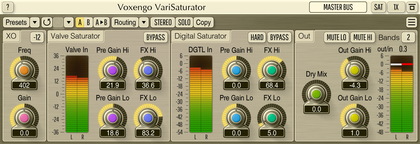
Low/high controls are unrelated to M and S channels.  What you should be looking for is group assignments.  Please load the 'Stereo Impact' preset - you'll see what I mean.  In group 1 all controls affect the "mid" channel, in group 2 all controls affect the "side" channel.

A bit more details:

Q.  How do I setup mid/side processing?
A.  This is done in the “Channel Routing” window.  First of all, you should choose a pair of internal channels which you would like to process in mid/side mode.  You should assign these channels to the same mid/side pair (e.g. “MS1”).  Then you will need to assign these channels to separate channel groups as otherwise you won’t be able to separately control the processing applied to both.  For example, you may choose to assign the “mid” channel to group 1, and the “side” channel to group 2.  After this has been done, you will be able to set the separate processing parameters for the “mid” channel by selecting group 1 for editing.  The “side” parameters are accessible by selecting group 2 for editing.  Alternatively, you may simply load the “Mid-Side Stereo” routing preset that will setup the necessary routing for you.
This topic was last updated 180 days ago, and thus it can be considered old.  Replying is disabled for this topic.

Copyright © 2002-2012 Aleksey Vaneev - Terms of Use - Privacy Policy - About Voxengo - Questions & Answers