Voxengo r8brain PRO


Primary User Guide (PDF): English, Français, Deutsch, Русский язык
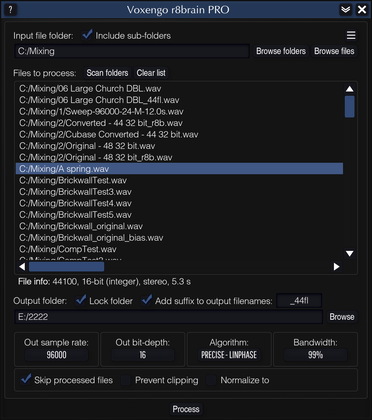
r8brain PRO is a professional sample rate converter tool software designed to deliver an unprecedented sample rate conversion (SRC) quality. Unlike other existing SRC algorithms available on the market, r8brain PRO implements sample rate conversion processing in its full potential: interpolation and decimation steps without exploiting any kind of simplifications; the signal is resampled in a multi-step manner using a series of intermediate sample rates based on whole-numbered up/down factors. This makes conversion perfect – both in signal-to-noise and timing precision aspects. Such whole number-factored SRC can be considered a golden standard in sample rate conversion since it is not subject to jitter nor timing errors.
Like many existing SRC algorithms, r8brain PRO offers you a linear-phase conversion mode. But more importantly, you also have an option of using the minimum-phase conversion mode, which finally brings SRC with true analog qualities to affordable digital audio workstations: in this mode, r8brain PRO works like an ideal digital-to-analog converter followed by an analog-to-digital converter, to resample the audio. This eliminates pre-ringing associated with linear-phase designs while introducing a minimal amount of phase coloration.
r8brain PRO can read mono, stereo, and multi-channel files in WAV, RF64, Wave64, and AIFF file formats, creating 16-, 24-, 32-, and 64-bit mono, stereo, and multi-channel WAV (RF64) files in fixed- and floating-point formats. EBU BWF (broadcasting) extensions, extensible wave format, markers, sample loops, and textual data residing inside a file are also supported. For the sake of convenience, r8brain PRO allows you to perform multi-threaded batch conversions that utilize the full potential of your computer.
r8brain PRO's bit-depth conversion uses an industry-standard “flat” TPDF dithering. We have decided not to implement noise-shaping dithering because audio production software available on the market usually offers the user a noise-shaping dithering of some kind already (you can also use our Elephant plugin for this feature). We also based our decision on the fact that the sample rate conversion process often adjusts peak profile of the original program material, thus, in many cases, making a subsequent peak-limiting a necessity. To prevent output audio from clipping we have implemented a level normalization feature.
Please note that r8brain PRO is a standalone application, and not a plugin.