Forums  »  Products  »  CurveEQ  »  curve eq ver.3!


Last

Next

Previous

First


hi aleksey,

ive seen you mention version 3 of this plugin, and since its one im still considering i was wondering what kind of things would feature?

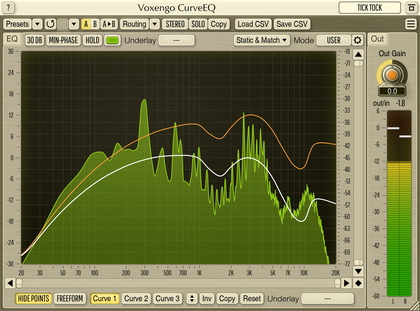
the one thing that would really make it for me, would be graph handling more like harmonieq, because the current curve eq implementation i find quite fiddly, and as such have been put off buying it for track eq (although i understand it was originally intended as more of a mastering eq).  finally is an update a long way off?

thanks
bart.

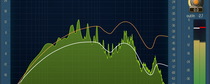
Also spectrums have come a long way in the Voxengo line since CurveEQ.  Maybe something along the lines of GlissEQ/Span for visuals might improve the usability for CurveEQ v3 !

bart, the way you edit EQ curve in CurveEQ is what makes it stand from other EQs.  I have no plans to change that beside making editing even more comfortable.

Spectrum display will be 'upgraded' for sure.

ok,

just to clarify, i didnt mean the whole concept just the way the handles worked, as i love the ease in harmonieq.  but i get your point, i think im looking from the wrong angle anyway and wanting it to also be something its not.

thanks,

bart, in terms of drawing EQ curves, try this...

Reset the EQ to 60 bands
Double click with the right mouse button on the background (this will change it to Edit View).
Hold down Alt and move a part of the frequency spectrum up or down ...  not sure if this has been mentioned in the manual but I love this feature and it is how I use CurveEQ most the time.

Aleksey, in v3, the main thing I'd love to see is labelling of all attributes on the GUI please.  I find it REALLY hard to remember what V1 - V7, S1 - S3 .etc mean ...  I am cconstantly referring back to the manual.  Also could you make the presets accesible from the main GUI like other Voxengo plugins ?

Great plugin, looking forward to v3

Cheers
Fots

I'm collecting all requests for the version 3 and will be implementing them.

Awesome Aleksey.  I have one more little idea...

I think it would be awesome to be able to morph between the EQed sound and the original sound.  I realise you currently have the UP and DOWN arrows to increase or decrease EQ height but unfortunately the UP and DOWN arrows have 2 disadvantages...

- Not enough accuracy (would be nice to be able to set this very fine / in smaller increments)
- When using the capture spectrum, the EQ curve is ALWAYS too drastic and I always find myself using the UP and DOWN arrows to compensate, but if we had a morph knob.  We could set the morph to say 50 % and there we would be no need to readjust every time you capture and match a spectrum.  This allows you to the use the EQ purely for capture / match purposes.

Steinberg FreeFilter has a similar concept to the one I'm mentioning, it's an accurate control that allows you to morph between no EQ and 100 % EQ ...  right upto 200 % EQ.

This knob would serve a completely different purpose to the UP and DOWN arrows so I think it would be great to keep both in there.

Just a thought, please consider it for v3

Thanks a lot
Fots

Aleksey Vaneev: I'm collecting all requests for the version 3 and will be implementing them.
so i'm assumeing version 3 will be released in the near future, has work already began on it?can we expect it soon?


fgimian - would you define your meaning and usage of morph please?  Thanks! -Kyle

fgimian, thanks.

sounddesigner, I have partially started to work on it, but I can't say when it will be finished.


Last

Next

Previous

First


Post Your Reply
You are not logged in.


Copyright © 2002-2008 Aleksey Vaneev

Terms of Use - Privacy Policy