|
This topic was last updated 180 days ago, and thus it can be considered old. Replying is disabled for this topic.
|
Aleksey Vaneev
on Jan 13, 2010, 4:58pm:
An updated version 3.1 of Voxengo GlissEQ is now available for download. Voxengo GlissEQ is a dynamic parametric equalizer plug-in for professional audio and sound production applications, available in AudioUnit and VST plug-in formats, for Mac OS X and Windows computers. This version implements the following changes:

The most interesting and unique feature GlissEQ offers you is its filters with dynamic behavior. Such “dynamic behavior” gives you a friendly, assisting equalization experience. Boosting up the highs will not create the fatiguing effect of overload; boosting up the lows will not make things sound mushy. Instead, you will get a pleasant transient-emphasizing effect bringing life and dimension to your tracks.
GlissEQ features:
Demo version of Voxengo GlissEQ and other pro audio plug-ins can be downloaded at the Voxengo web site: http://www.voxengo.com/
- Preset "update" function implemented in the preset manager.
- Selected filter's curve is now always shown, not only when hovered.
- Filter selection (scrolling) buttons added.
- Control points can now be double-clicked to disable/enable the filter.
- The "VST Function Sync" global switch was added that fixes crashes in some hosts (i.e. Tracktion).
- Control surface readout now displays musical note.
- "Density mode" implemented in the output level meter.
- "Ctrl+Drag" narrow-band sweeping implemented.
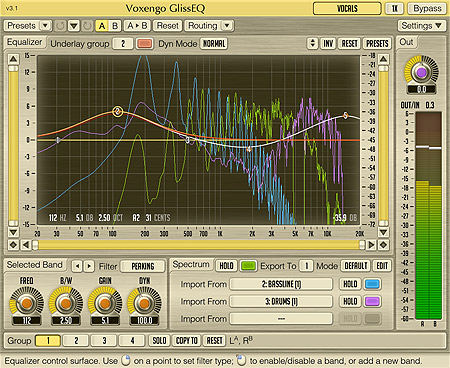
The most interesting and unique feature GlissEQ offers you is its filters with dynamic behavior. Such “dynamic behavior” gives you a friendly, assisting equalization experience. Boosting up the highs will not create the fatiguing effect of overload; boosting up the lows will not make things sound mushy. Instead, you will get a pleasant transient-emphasizing effect bringing life and dimension to your tracks.
GlissEQ features:
- Filters with dynamic behavior
- Real-time spectrum analysis
- Real-time spectrum import/export
- Up to 32 filter bands
- 16 filter types
- Harmonically-enhanced filter type
- Narrow-band sweeping
- Multi-channel processing
- Internal channel routing
- Channel grouping
- Mid/side processing
- Up to 8x oversampling
- 64-bit floating point processing
- Preset manager
- Undo/redo history
- A/B comparisons
- Contextual hint messages
Demo version of Voxengo GlissEQ and other pro audio plug-ins can be downloaded at the Voxengo web site: http://www.voxengo.com/
walterius
on Jan 13, 2010, 6:29pm:
Thanks so much - this is one of the best wappons in the audiofight :-)
i like especially that we can see now what the dynamic does .. yeah
Aleksey Vaneev
on Jan 14, 2010, 4:22pm:
You are welcome!
dantarbill
on Jan 14, 2010, 5:02pm:
Thanks especially for bringing the "Ctrl+Drag" back.
Aleksey Vaneev
on Jan 14, 2010, 6:09pm:
dantarbill: Thanks especially for bringing the ''Ctrl+Drag'' back.
Note that it's now more useful - you can adjust the bandwidth.
mljung
on Jan 18, 2010, 10:43am:
Thanks for the update Aleksey - the operation is so much better now..!
:-)
Mads
:-)
Mads
dantarbill
on Jan 18, 2010, 3:39pm:
dantarbill: Thanks especially for bringing the ''Ctrl+Drag'' back.
Aleksey Vaneev: Note that it's now more useful - you can adjust the bandwidth.
Thanks for the heads up. I tried to find that mentioned in the "GlissEQ User Guide" PDF, and failed to even find the Ctrl+Drag mentioned, let alone the mechanism to adjust the bandwidth...so I just guessed and discovered that Ctrl/Alt+Drag does it.1) Don't you think this should be mentioned in the documentation?
2) What other "Easter Eggs" are buried in the user interface that it would be good to share with the class?
Aleksey Vaneev
on Jan 18, 2010, 4:51pm:
dantarbill: Thanks especially for bringing the ''Ctrl+Drag'' back.
Aleksey Vaneev: Note that it's now more useful - you can adjust the bandwidth.
dantarbill: Thanks for the heads up. I tried to find that mentioned in the ''GlissEQ User Guide'' PDF, and failed to even find the Ctrl+Drag mentioned, let alone the mechanism to adjust the bandwidth...so I just guessed and discovered that Ctrl/Alt+Drag does it.
Well, you've obviously missed the "Primary User Guide". Please check it out.
dantarbill
on Jan 19, 2010, 3:43pm:
dantarbill: Thanks for the heads up. I tried to find that mentioned in the ''GlissEQ User Guide'' PDF, and failed to even find the Ctrl+Drag mentioned, let alone the mechanism to adjust the bandwidth...so I just guessed and discovered that Ctrl/Alt+Drag does it.
Aleksey Vaneev: Well, you've obviously missed the ''Primary User Guide''. Please check it out.
Sorry 'bout that. You're right. I was assuming that the narrow band sweep was specific to GlissEQ, so I expected to see it documented in the GlissEQ User Guide. Can I then assume that this functionality will be inherited by Voxformer in whatever its next release is (and CurveEQ when it's upgraded to the new platform)?
Aleksey Vaneev
on Jan 19, 2010, 4:11pm, edited 1 time(s), last modified on Jan 19, 2010, 4:12pm:
Aleksey Vaneev: Well, you've obviously missed the ''Primary User Guide''. Please check it out.
dantarbill: Sorry 'bout that. You're right. I was assuming that the narrow band sweep was specific to GlissEQ, so I expected to see it documented in the GlissEQ User Guide. Can I then assume that this functionality will be inherited by Voxformer in whatever its next release is (and CurveEQ when it's upgraded to the new platform)?
Yes, this is going to be a standard feature. BTW, mouse wheel can be used to adjust the bandwidth, too.
|
This topic was last updated 180 days ago, and thus it can be considered old. Replying is disabled for this topic.
|
Copyright © 2002-2012 Aleksey Vaneev - Terms of Use - Privacy Policy - About Voxengo - Questions & Answers