|
This topic was last updated 180 days ago, and thus it can be considered old. Replying is disabled for this topic.
|
Aleksey Vaneev
on Jun 25, 2008, 8:09pm:
An updated version 1.5 of Voxengo Overtone GEQ has been released and is available for download. Overtone GEQ is a free 7-band equalizer plug-in in AudioUnit and VST plug-in formats for Windows and Mac OS X computers.
Version 1.5 change list:

Overtone GEQ was designed to be a quick EQ shape adjustment tool for mixes and sub-mixes. During its operation, Overtone GEQ applies harmonic enhancement processing that delivers a special touch and shine to the sound.
Overtone GEQ features:
Overtone GEQ and other Voxengo plug-ins can be downloaded at the Voxengo web site: http://www.voxengo.com/
Version 1.5 change list:
- Various minor fixes.
- "Tablet mode" global option added.
- "Auto oversampling level" global option added.
- Virtual keyboard implemented.
- Channel group output soloing implemented.
- Superfluous "Copy To" button removed.
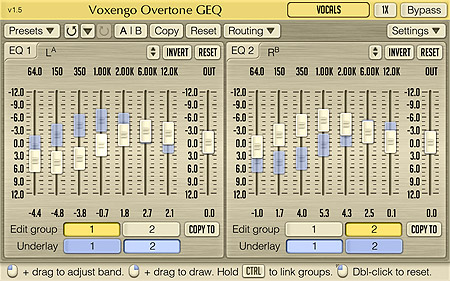
Overtone GEQ was designed to be a quick EQ shape adjustment tool for mixes and sub-mixes. During its operation, Overtone GEQ applies harmonic enhancement processing that delivers a special touch and shine to the sound.
Overtone GEQ features:
- 7-band graphic equalizing
- +/- 12 dB gain range per band
- 2 graphic equalizer views
- Multi-channel processing
- Internal channel routing
- Channel grouping
- Mid/side processing
- Complex harmonic coloration
- 64-bit floating point processing
- Preset manager
- Undo/redo history
- A/B comparisons
- Contextual hint messages
Overtone GEQ and other Voxengo plug-ins can be downloaded at the Voxengo web site: http://www.voxengo.com/
Dandruff
on Jun 26, 2008, 4:40pm:
Thanks for the fixes and additions!
Some things I found:
1. The "Unnamed Instance" field still has problems with some characters here:
I'm using german keyboard and
; gets displayed as <
: gets displayed as >
ä gets displayed as '
ü gets displayed as ;
# gets displayed as /
' gets displayed as ?
+ gets displayed as =
* gets displayed as +
^ gets displayed as \
° gets displayed as|
ö isn't accepted at all
| isn't accepted at all
@ isn't accepted at all
µ isn't accepted at all
€ isn't accepted at all
~ isn't accepted at all
ß isn't accepted at all
there are some more ...
2. when using the "4x" oversampling and switching to the generic UI of the host (Reaper here), the slider is all the way to the right already (as it were "8x")!?
3. why is the scale showing "-12.0" at the top and "12.0" at the bottom? shouldn't it be the other way, "+12.0" at the top and "-12.0" at the bottom?
4. there's no "limit" on the faders:
-> grab a fader and move it to +12dB -> don't release the mouse button -> continue moving the mouse to the top (as you would wanna go to +24dB or so). ok, now move the mouse back to the bottom. now the slider doesn't move back immediately, because there was no "limit" at +12dB. hope you understand my explanation!?
Some things I found:
1. The "Unnamed Instance" field still has problems with some characters here:
I'm using german keyboard and
; gets displayed as <
: gets displayed as >
ä gets displayed as '
ü gets displayed as ;
# gets displayed as /
' gets displayed as ?
+ gets displayed as =
* gets displayed as +
^ gets displayed as \
° gets displayed as|
ö isn't accepted at all
| isn't accepted at all
@ isn't accepted at all
µ isn't accepted at all
€ isn't accepted at all
~ isn't accepted at all
ß isn't accepted at all
there are some more ...
2. when using the "4x" oversampling and switching to the generic UI of the host (Reaper here), the slider is all the way to the right already (as it were "8x")!?
3. why is the scale showing "-12.0" at the top and "12.0" at the bottom? shouldn't it be the other way, "+12.0" at the top and "-12.0" at the bottom?
4. there's no "limit" on the faders:
-> grab a fader and move it to +12dB -> don't release the mouse button -> continue moving the mouse to the top (as you would wanna go to +24dB or so). ok, now move the mouse back to the bottom. now the slider doesn't move back immediately, because there was no "limit" at +12dB. hope you understand my explanation!?
Aleksey Vaneev
on Jun 27, 2008, 5:43pm:
OK thanks..
Keyboard entry is still in its early stage - we will be fixing it. But we won't allow all kinds of letters to be entered - only English alphabet. Please do not ask for full key entry support - it is not a text editor, and fonts we use may not have all letter glyphs (I'm a bit worried if somebody asks for Japanese text support).
2. Is not a problem since this parameter is discrete while automation is not.
3. This is a mistake I have not noticed - will be fixed.
4. This is not a mistake - it is a logical outcome and is the same as when you are free-drawing curve with the right mouse button - you have to move cursor back after going beyond the graph. I do not think this creates a problem. You may simply release the mouse button. But may be this can be fixed from our side.
Keyboard entry is still in its early stage - we will be fixing it. But we won't allow all kinds of letters to be entered - only English alphabet. Please do not ask for full key entry support - it is not a text editor, and fonts we use may not have all letter glyphs (I'm a bit worried if somebody asks for Japanese text support).
2. Is not a problem since this parameter is discrete while automation is not.
3. This is a mistake I have not noticed - will be fixed.
4. This is not a mistake - it is a logical outcome and is the same as when you are free-drawing curve with the right mouse button - you have to move cursor back after going beyond the graph. I do not think this creates a problem. You may simply release the mouse button. But may be this can be fixed from our side.
Dandruff
on Jun 27, 2008, 6:04pm:
Aleksey Vaneev: Keyboard entry is still in its early stage - we will be fixing it. But we won't allow all kinds of letters to be entered - only English alphabet. Please do not ask for full key entry support - it is not a text editor, and fonts we use may not have all letter glyphs (I'm a bit worried if somebody asks for Japanese text support).
ok. but at least it would be nice to have german keyboard support, so that the plugin displays the things i press on my keyboard. Aleksey Vaneev: 2. Is not a problem since this parameter is discrete while automation is not.
ok Aleksey Vaneev: 3. This is a mistake I have not noticed - will be fixed.
thanks :) Aleksey Vaneev: 4. This is not a mistake - it is a logical outcome and is the same as when you are free-drawing curve with the right mouse button - you have to move cursor back after going beyond the graph. I do not think this creates a problem. You may simply release the mouse button. But may be this can be fixed from our side.
yeah, would be great! current behaviour makes no sense in my opinion. have a look at the faders in Reaper! in fine-tune mode (CTRL+Drag) they work the way i would like it in your plugins too.
Aleksey Vaneev
on Jun 27, 2008, 7:34pm:
Dandruff, are you using Mac or PC computer?
Dandruff
on Jun 27, 2008, 8:28pm:
PC with german Windows XP SP3
Aleksey Vaneev
on Jun 28, 2008, 7:28am:
OK, thanks.
Dandruff
on Jun 28, 2008, 8:25am:
One more question: What is the button with the up/down arrows (on the left of the "Invert" button) for? Seems to do nothing here!?
Aleksey Vaneev
on Jun 28, 2008, 8:50am:
Dandruff: One more question: What is the button with the up/down arrows (on the left of the ''Invert'' button) for? Seems to do nothing here!?
You have to drag it - it is a scaling function.
Dandruff
on Jun 28, 2008, 8:53am:
ah, ok. works :)
|
This topic was last updated 180 days ago, and thus it can be considered old. Replying is disabled for this topic.
|
Copyright © 2002-2012 Aleksey Vaneev - Terms of Use - Privacy Policy - About Voxengo - Questions & Answers