Voxengo Logo
On-line links: Products - Downloads - Purchase - Contacts - Forums
Voxengo Warmifier VST HELP

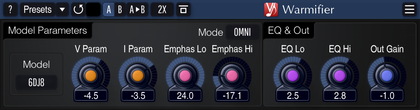
Voxengo Warmifier VST Screenshot


Contents

Introduction
Preset management
Mode buttons
Knob control
Parameters
Linear phase mode
Troubleshooting tips and additional information


Introduction

Warmifier is a special PC VST plug-in module which processes a signal in a way similar to analog valve equipment. This means that you can achieve a classic valve warming effect right in your PC DAW environment.

Warmifier can be applied both to the complete mix and to the individual instruments. You have several parameters at your disposal that allow you to control the strength and the color of the warming effect. Also, you have several valve types to choose from. Each valve type offers a different degree of coloration.

Voxengo Warmifier features:

  • Seven valve types
  • Two processing modes
  • High quality mode
  • "A-to-B" comparisons
  • Mono-to-Stereo, Stereo-to-Stereo processing
  • Any sample rate is supported
  • Factory presets
  • 64-bit internal precision
  • Native assembler DSP code


  • Preset management

    Top buttons

    You can use the "Preset..." menu button to perform basic FXP/FXB preset/bank management tasks. The "Set as default" menu option of the "Presets..." menu allows you to assign the currently loaded program to the default preset program. This default program will be loaded whenever you enable a new instance of the plug-in or reset the current program. You can use the "Reset default" option to restore the default factory preset.

    By pressing the "A|B" button, you can exchange the current and shadow (or, alternatively, "A" and "B") programs. The "Copy" button copies the current program to a shadow one.

    Since only a single shadow program is used for the whole program bank, you can use "A|B" button to copy programs. To do so, you first need to switch to a program you want to copy and press the "Copy" button. Next, switch to a program where you want to put the first program and press the "A|B" button.

    The "Reset" button can be used to reset the current program. All parameters will return to their default states.


    Mode buttons

    Mode buttons

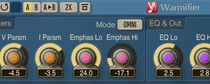
    The "Mode" button allows you to select the processing mode of Warmifier. The default Mode 1 can be described as an omni-type mode: when it is enabled, signals of varying levels are affected equally as if they were of equal volume. Mode 2 is different in this regard: signals of different levels are affected differently, and thus overall coloration is lower in Mode 2. In Mode 1 the frequency balance of the program material being processed plays a significant role in the coloration achieved. The Flt Lo and the Flt Hi parameters described below allow you to internally adjust the frequency balance, thus allowing you to get various degrees of coloration.

    Please note that Mode 2 is not fully tolerant to the overloads on the plug-in's input stage. Make sure you do not overload the plug-in. Otherwise you may get some unpleasant distortion. It is safe to overload the plug-in in Mode 1 since, in this mode, Warmifier makes no differentiation between the various incoming audio levels.

    The "FLT On/Off" switch enables or disables the internal filters controlled by the Flt Lo and Flt Hi parameters.

    The "EQ Pre/Post/Off" switch changes the position of the equalizer in the signal path or disables it completely.

    The "High/Normal Quality" button is used to switch between the normal and the high-quality processing modes. High-quality processing mode internally uses a two times higher sample rate, performing 2x oversampling. High quality mode uses about two times more CPU resources. The "Auto" quality mode disables oversampling in the normal real-time plug-in operation and turns oversampling on during the offline audio bouncing. Please note that the "Auto" mode may not work properly in all hosts (if the host does not report back when it enters the offline processing mode).


    Knob control

    Knob control

    To change a knob control's value, drag it with the left mouse button and move it up or down. For finer adjustment, press the right mouse button while dragging. Double-clicking on the knob with the left mouse button will return the knob to its default position.


    Parameters

    Type specifies the type of valve being used. Generally, it is impossible to describe each valve type since every valve has its own character which can be understood only in practice.

    Prm V and Prm I parameters control the characteristics of the processing, including harmonic content being added to the signal. Prm I in an obvious way controls the strength of the processing while Prm V can provide additional fine-tuning.

    Flt Lo and Flt Hi parameters control the slope of two internal shelving filters. Such filters are used to further control the coloration of the processing. When the specified value for the Flt Hi is positive, higher frequencies will be affected more than the lower frequencies if elements of both low and high frequencies are in presence in the signal. Negative values give more weight to the lower frequencies. When the Flt Hi value is negative, you can expect sound to be shifted towards bass frequencies more and can be described as a `wet' setting. With positive values a somehow `dry' sound is created. Pretty much the same--though, opposite--applies to the Flt Lo parameter. Generally, you should expect some very subtle changes when tweaking these parameters. Flt Lo is tuned to 50 Hz, Flt Hi is tuned to 640 Hz.

    EQ Lo specifies the gain of the low peaking filter. This filter is tuned to 60 Hz, 3.7 oct.

    EQ Hi specifies the gain of the high peaking filter. This filter is tuned to 10 kHz, 3.7 oct.

    Out simply controls the output signal gain. A special button near the Out knob label turns red when three sequential clip incidents were detected on any output channel. Click this button to reset it to its normal state.


    Linear phase mode

    Linear phase mode can be engaged on the '?' dialog screen. This is a global option affecting all loaded instances of Warmifier plug-in. Please note that when this mode is engaged plug-in will introduce processing latency (5000 samples). This mode also uses more CPU resources overall.

    Linear phase mode delivers a considerably more focused and crisp sound because it uses linear-phase filters on the most important processing stages.


    ?

    Pressing this button will display the plug-in's info screen. This screen shows copyright and registration information, and contains the "Help" button which opens the bundled HTML help file you are reading now.


    Troubleshooting tips and additional information


    What is the difference between Warmifier and Lampthruster?

    The difference is huge, and is mainly comprised of the processing model. Warmifier is better at adding 'brown' color without even hearing any obvious distortion while Lampthruster is crisp and bright and can give a slight distortion flavor. You should understand that the DSP code of both plug-ins is *totally* different. The overall sound is very different, too.


    Flt Lo and Flt Hi: are these filters tied to the same frequencies as the peaking filters (i.e. 60 HZ and 10kHz), or are they set differently? I'm just wondering, for example, if I set Flt Hi to, say, -6dB, I'm assuming that at some point higher than a specific frequency point, the "coloration" of Warmifier will be -6dB less audible...

    Flt's are tuned to 50 and 640 Hz, but they are shelving filters. Indeed, if you lower the Flt Hi the coloration in the higher frequency range should be less audible.


    Some people keep on remarking about the sound colorations and how they're wonderful, but I just can't get quite the difference between a dry audio signal and one, say, passed thru the Warmifier.

    Understanding this topic can be really difficult. For example some people still tend to say Warmifier does not do anything useful to their sounds. However, there IS difference. For example, if you take a simple sinewave in a software synth you will quickly hear that it sounds dull alone. But if you add some overdrive this simple sine immediately starts to sound 'fuller'.


    I would like to use Warmifier in mastering to give my mixes and analog warmth and feel. When mastering I usually use EQ, then compressor then limiter at the end of the chain. Where can I place the Warmifier in this type of a setup?

    I think one of the best places for it would be before the limiter in the chain.


    I'm not getting the 'Prm V' and 'Prm I' knobs.

    Prm V and Prm I actually control the gain characteristics of the tube. I'm not sure if it is totally correct to say this, but Prm V is a voltage control, Prm I is a current control. Both affect the characteristics of the sound you get. I would also suggest to use Prm I values below -3.5 dB, because if it is above this point some internal clipping occurs. It should be noted that these controls do not work exactly like you would expect them to work in a schematic.


    Today we tried to use Warmifier on a piano&cello mastering. We noticed on some silent slow piano solo passages very rude distortion (the level of the input signal between -60 and -70 dB).

    Indeed, Warmifier may bring some distortion. It can be also true that this distortion has something to do with the settings. I believe it is possible to find settings which do not show that much distortion while preserve the sound feel you like.


    No matter what presets I use there is no difference in the sound of material processed with Lampthruster or Warmifier. They increase the volume but the character of the sound is unchanged.

    Both Lampthruster and Warmifier are mostly subtle effects. You may adjust their EQ controls to make sure effects are working. Harmonic enhancement handling usually requires user experience above average. There is difference between the presets (especially in Lampthruster), but to hear it you should know what to hear and you should be using high end sound reproduction equipment. On small speakers or budget soundcard these differences may not be so apparent. This is a nature of plug-ins - not their fault.


    I need your advices about Mode 1 or Mode 2.

    Mode 1 is kind of 'omni-level' mode. It will add equal harmonic content to singals of any volume level. Mode 2 is more 'natural' - it will add less harmonic coloration to softer sounds.


    I am thinking of using Warmifier or Lampthruster to refresh old classical tape recordings where high frequencies have been lost during the years. Are these plugins suited for this task?

    I think with Lampthruster you may get more higher frequencies. Warmifier is more subtle. However, I may suggest you to look for some dedicated higher frequencies generator FXs which are too strong for everyday work, but which may recover highs better.


    Happy Warmifying!


    Copyright © 2003-2007 Aleksey Vaneev

    VST is a trademark of Steinberg Media Technologies GmbH.
    All other trademarks belong to their respective owners.
    Plug-in uses PNG library by Gustavo Huffenbacher Daud