Introduction
With the introduction of a new PC VST plug-in LF-Max--which is
now available for download--Voxengo continues development of tools designed to
perform low-frequency adjustments.
The main function of LF-Max is to add sub low-frequency content to the
program material and to the individual mix tracks. Beside this, it features
a distortion module like the one found in Voxengo LF-Punch plug-in. Signal
flow is different from LF-Punch, though. LF-Punch processes
low-frequency band "in-place", while LF-Max mixes distorted signal result with
the original low-frequency signal.
Internally, LF-Max produces three signals: the first one is the original
low-frequency signal, which is extracted by means of an adjustable crossover
filter; the second one is the distorted signal, which is generated by applying
distortion to the original low-frequency signal; and the third signal is the
sub-frequency signal, which is synthesized from the original low-frequency
signal. These signals can then be mixed together in the desired
proportion.
LF-Max also reproduces finite word-length effects on all processing stages
of the plug-in (but without any kind of clipping occuring). Theoretically,
a plug-in should have the flavor of outboard 24-bit DSP processors, which is
usually subjectively considered by audio engineering professionals as "better
sounding".
Voxengo LF-Max features:
Sub frequency generator
Distortion module
Two distortion modes
Distortion, sub and original signal blending
FX monitoring switch
"A-to-B" comparisons
Mono-to-Stereo, Stereo-to-Stereo processing
All sample rates supported
24-bit DSP chip imitation
Native assembler DSP code
Preset management
You can use the "Preset..." menu button to perform basic FXP/FXB
preset/bank management tasks. The "Set as default" menu option of
the "Presets..." menu allows you to assign the currently loaded program
to the default preset program. This default program will be loaded whenever
you enable a new instance of the plug-in or reset the current program. You can
use the "Reset default" option to restore the default factory
preset.
By pressing the "A|B" button, you can exchange the current and
shadow (or, alternatively, "A" and "B") programs.
The "Copy" button copies the current program to a shadow one.
Since only a single shadow program is used for the whole program bank, you
can use "A|B" button to copy programs. To do so, you first need to switch to
a program you want to copy and press the "Copy" button. Next, switch to a
program where you want to put the first program and press the "A|B"
button.
The "Reset" button can be used to reset the current program. All
parameters will return to their default states.
Parameters
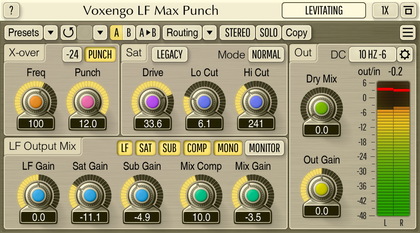
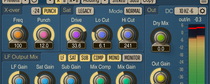
Center - cutoff (center) frequency of the internal crossover filter.
DistDrive - power of the distortion applied to the low-frequency
signal.
Filter - high cut filter's frequency: with this filter you may
remove higher harmonics after distortion is applied.
DistGain - amount of distorted signal added to the output.
Dist Mode button selects distortion module processing mode.
The "Precise" mode works in a pretty straight-forward way by applying
"plain" distortion to the low-frequency signal. The "Pump" mode applies
a little less predictable distortion which sounds best on separate techno kick
drum tracks, because in this mode, distortion lowers the level of the body of
the kick drum, making the resulting sound more "punchy" than in the "Precise"
mode. However, this "Pump" mode may not be suitable for overall mix
processing as it may exaggerate surrounding bass notes.
Sub Gain - amount of sub frequencies added to the output.
The Sub frequency generator works with the low-frequency signal extracted by the
internal crossover filter. If this filter is tuned to 128 Hz, this will
generate a 64 Hz "sub" signal. This works pretty well in most cases and
"fattens" the sound a lot, and even imparts a subtle presence effect.
LF Gain - signal gain of the original low-frequency band.
Out - overall output gain control.
Monitor switch bar allows you to listen to different signals inside
the plug-in. You may use the "LF+HF" option to hear the sound of the
crossover filters working inside the plug-in.
In this plug-in you can already use wet/dry mix. All three signals
(distortion, original and sub) have a separate gain control.
First of all you should probably remove the 'Dist' signal from the output -
set the DistGain to -inf. This way you can add subharmonics alone. However,
subharmonics CAN alter the sound, and in some musical phrases they may sound
dissonant.
LF-Punch emphasises transients, and features a low-frequency signal
compressor (which is not the same as distortion) - LF-Max does not offer these
features. LF-Max was really designed just to add some 'oomhp' and a bit of
density to lower frequencies - but it can't emphasize dynamics in a way
LF-Punch does it.